To repurpose your old phone as a security camera or baby monitor, start by ensuring it has enough battery life and storage, then update its operating system if needed. Install a compatible security or monitoring app like Alfred or Manything, set up motion alerts, and position the device in a strategic spot facing the area you want to monitor. For more detailed steps and tips on optimizing your setup, keep exploring how to make the most of your device.

Get the latest gadgets delivered free with Prime
- Fast, free delivery on millions of items
- Prime Video, Amazon Music and more included
- Member-only deals all year
Key Takeaways
- Update the phone’s OS, free storage, and install security or baby monitor apps like Alfred or Manything.
- Position and mount the device in key areas, ensuring the camera faces the desired view with good lighting.
- Configure app settings for motion alerts, remote monitoring, and two-way audio if available.
- Secure the device on a stable mount and test video streaming and camera functionality regularly.
- Use Wi-Fi connection for live streaming, and consider additional lighting or infrared mode for nighttime visibility.
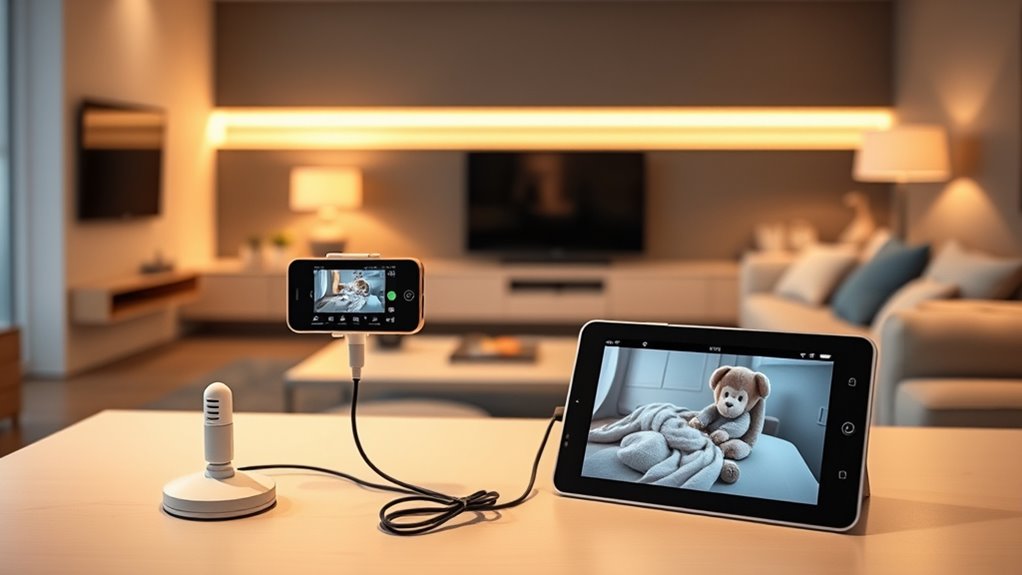
If you have an old phone gathering dust, repurposing it is a smart way to give it a new life instead of letting it go to waste. Instead of tossing it out, you can turn your unused device into a DIY security camera or baby monitor, which not only saves money but also promotes eco-friendly tech recycling. This approach is perfect if you’re looking to boost your home security without investing in expensive equipment. Plus, it’s easy to set up and customize based on your needs.
Repurpose your old phone into a DIY security camera or baby monitor to save money and promote eco-friendly recycling.
Start by ensuring your old phone has enough battery life and storage space, and update its operating system if necessary. Next, connect it to a reliable Wi-Fi network, so it can stream video smoothly. Download a compatible security app—many free options like Alfred, Manything, or Presence are user-friendly and reliable. These apps turn your phone into a live streaming device you can monitor remotely from another smartphone or computer. Once installed, configure the app’s settings to detect motion or send alerts, enhancing your DIY security setup. You can position the phone in key areas around your house—near entrances, hallways, or nurseries—where monitoring is most critical.
Beyond the app, consider mounting your old phone securely using a stand or adhesive mount. Make sure the lens faces the area you want to monitor. Keep in mind that lighting conditions matter; for nighttime visibility, enable infrared mode if your device supports it or add supplemental lighting. This way, you maximize the camera’s effectiveness. When your old phone is used as a baby monitor, you can set it up in the nursery, keeping an eye on your little one from another room or even remotely. Some apps offer two-way audio, so you can talk to your baby or soothe them if needed.
Repurposing your old phone as a security gadget aligns with eco-conscious tech recycling practices, reducing waste and extending the device’s usefulness. It’s an affordable, customizable solution that requires minimal effort but offers significant peace of mind. Plus, it’s a great way to dip your toes into DIY security projects without technical expertise. As you get comfortable, you might explore more advanced features like cloud storage or integrating the camera feed with smart home systems.
In the end, repurposing an old phone as a security camera or baby monitor is a practical, eco-friendly choice. It’s a perfect example of how DIY security and trusted resources can help you make smarter use of devices you already own. With just a few simple steps, you turn an obsolete gadget into a valuable home security tool—saving money, reducing waste, and gaining added peace of mind.
security camera app for old smartphones
As an affiliate, we earn on qualifying purchases.
As an affiliate, we earn on qualifying purchases.
Frequently Asked Questions
Can I Repurpose an Old Phone Without Internet Access?
Yes, you can repurpose an old phone without internet access by enabling offline functionality and utilizing local storage. You’ll need to set up a local network or use a direct connection like Bluetooth or Wi-Fi hotspot. This allows your phone to record and store footage locally, which you can access later. Keep in mind, without internet, live remote monitoring isn’t possible, but your device still functions as a security camera or monitor within your local network.
What Security Risks Are Involved in Repurposing a Phone?
Imagine your old phone as a vigilant guardian, but it’s not invincible. You face risks like data privacy breaches and hacking vulnerabilities, which could let intruders access your footage or personal info. To keep your device secure, update software regularly, disable unnecessary features, and use strong passwords. Being aware of these security risks helps you protect your home and loved ones from potential cyber threats while repurposing your phone.
How Long Does the Battery Last in a Repurposed Security Camera?
Your repurposed security camera’s battery life varies based on usage and power management. Typically, it lasts anywhere from a few hours to a day if you’re streaming video constantly. To extend battery life, you should optimize power management by lowering screen brightness, disabling unnecessary apps, and setting the device to sleep mode when inactive. Regularly charging the phone guarantees continuous security coverage without interruptions.
Is There an App That Combines Camera and Baby Monitor Functions?
Yes, there are integrated apps that combine camera and baby monitor functions, giving you a seamless experience. Apps like Alfred, Dormi, or Cloud Baby Monitor offer combined features, allowing you to monitor your baby with video and audio while managing security camera functions. These apps are easy to set up, work across devices, and often include alerts, making them perfect for repurposing your old phone into a versatile monitoring tool.
What Are the Best Placement Tips for Optimal Coverage?
Want perfect coverage? Position your phone high, like on a shelf or mount, to get wide camera angles and avoid blind spots. Make sure the lighting is balanced—avoid glare or shadows that can obscure details. Keep it steady and angled toward the area you want to monitor. Remember, a little planning goes a long way—think of your old phone as the superhero of home security, watching over everything!
mount for old phone security camera
As an affiliate, we earn on qualifying purchases.
As an affiliate, we earn on qualifying purchases.
Conclusion
Now that you’ve transformed your old phone into a security or baby monitor, you’ve turned it into a vigilant guardian watching over your home. Like a loyal lighthouse guiding ships safely through the night, your repurposed device stands guard, offering peace of mind. With just a little effort, you’ve given new life to old tech and created a dependable eye that never sleeps. Your device is now a silent protector, always ready to alert you when needed.
As an affiliate, we earn on qualifying purchases.
infrared night vision camera for smartphones
As an affiliate, we earn on qualifying purchases.
As an affiliate, we earn on qualifying purchases.
Fall Picks
fall essentials
As an affiliate, we earn on qualifying purchases.