
TL;DR
Open a free Amazon Business account
Business pricing, bulk buying and tax-exempt orders.
Create a free accountAs an affiliate, we earn on qualifying purchases.
KOReader, an open-source e-book reader app, has released new updates improving device compatibility and user customization. The development is confirmed by the project team and user feedback, with ongoing testing. This matters as it enhances the functionality of e-ink devices used by readers worldwide.
KOReader has released a new update that significantly improves support for a range of e-ink devices and introduces new customization features, according to official release notes and user feedback. This development enhances the usability of KOReader, a popular open-source e-book reader application, for a growing base of users relying on e-ink devices for reading.
The latest version of KOReader, version 2024.03, was officially released on March 15, 2024, by the project’s development team. The update includes expanded support for newer e-ink devices, such as PocketBook and Boyue models, which previously had limited compatibility. It also introduces new customization options, including adjustable font rendering, improved page-turning animations, and enhanced PDF rendering. According to the developers, these improvements aim to provide a more flexible and accessible reading experience for users. User reports indicate that the update has been well-received, with many noting smoother performance and increased device support. The project’s maintainers confirmed that the update was driven by community feedback and ongoing efforts to keep KOReader compatible with the latest hardware and formats.Why Improved Compatibility and Features Matter for E-Reader Users
This update is important because KOReader is widely used by readers seeking an open-source alternative to proprietary e-reader software. Enhanced device support means users of diverse e-ink models can now benefit from KOReader’s advanced features, potentially extending the lifespan of older devices. The customization enhancements also improve accessibility and user experience, making KOReader a more versatile tool for different reading preferences. As e-ink devices remain popular for their battery life and readability, these improvements could influence user choices and promote wider adoption of open-source software in the e-reader ecosystem.e-ink device compatible with KOReader
As an affiliate, we earn on qualifying purchases.
As an affiliate, we earn on qualifying purchases.
Background on KOReader’s Development and Community Support
KOReader was initially developed in 2014 as an open-source project aimed at providing advanced reading features on e-ink devices. Over the years, it has gained a dedicated community of developers and users who contribute to its ongoing development. The software supports multiple formats, including EPUB, PDF, and DJVU, and is frequently updated to improve performance and compatibility. Recent years have seen increased focus on supporting newer hardware and enhancing customization options, driven by community feedback and the proliferation of new e-ink devices. The March 2024 update continues this trend, reflecting ongoing efforts to keep KOReader relevant amid evolving hardware standards and user needs.“The latest update demonstrates our commitment to making KOReader compatible with the newest e-ink devices and providing users with more control over their reading experience.”
— KOReader Lead Developer
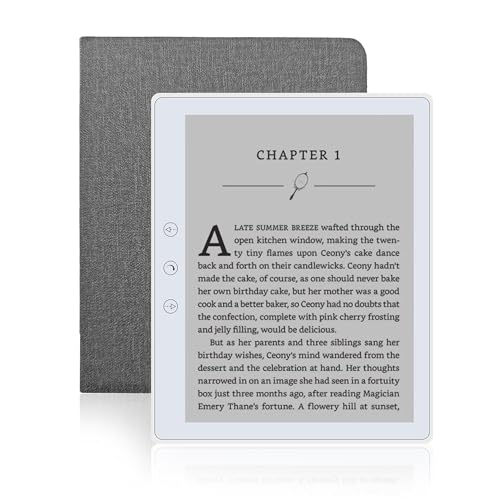
Veidoo 5.8 inch Ebook Reader, HD Touch Screen Carta E-Ink Technology, 32GB ROM(TF Card Expansion to 64G), WiFi, Long Endurance, Android E-Reader with Cover(White)
- Screen Size: 5.8-inch touch screen with E-Ink technology
- Eye-Friendly Display: Glare-free, paper-like reading experience
- Storage Capacity: 32GB internal, expandable to 64GB with TF card
As an affiliate, we earn on qualifying purchases.
As an affiliate, we earn on qualifying purchases.
Remaining Questions About Future Development and Compatibility
It is not yet clear how quickly the development team will implement support for upcoming hardware models or formats. Additionally, while the update improves many features, some users report lingering issues with specific device configurations, which are still being addressed. The long-term roadmap for KOReader’s compatibility with future device releases remains to be clarified by the project maintainers.
XTEINK X3 3.7" Pocket E-Ink eBook Reader, Mist Gray
- Compact and Lightweight: Only 58g and 5.1mm thin
- Paper-Like E-Ink Display: Gentle on eyes, distraction-free reading
- Easy One-Hand Operation: Gyroscope controls and physical buttons
As an affiliate, we earn on qualifying purchases.
As an affiliate, we earn on qualifying purchases.
Next Steps in KOReader’s Development and Community Engagement
The development team plans to release incremental updates addressing remaining bugs and expanding device support throughout 2024. Community forums and GitHub repositories will continue to serve as platforms for user feedback and feature requests. Users can expect further performance improvements and new customization options in upcoming versions, with ongoing transparency from the developers about future plans.Veidoo 5.8 inch Ebook Reader, HD Touch Screen Carta E-Ink Technology, 32GB ROM(TF Card Expansion to 64G), WiFi, Long Endurance, Android E-Reader with Cover(White)
- Screen Size: 5.8-inch touch screen with E-Ink technology
- Eye-Friendly Display: Glare-free, paper-like reading experience
- Storage Capacity: 32GB internal, expandable to 64GB with TF card
As an affiliate, we earn on qualifying purchases.
As an affiliate, we earn on qualifying purchases.
Key Questions
What devices does the latest KOReader update support?
The update improves support for several newer e-ink devices, including PocketBook and Boyue models, with ongoing efforts to add support for upcoming hardware.
Are there any known issues with the new update?
Some users have reported minor issues with specific device configurations, but the developers are actively working on fixes and improvements based on community feedback.
How can I update to the latest version of KOReader?
Users can download the latest version from the official KOReader GitHub repository or through their device’s custom firmware installation process, depending on the hardware.
Will future updates include new formats or features?
Yes, the development roadmap indicates ongoing support for additional formats and features, with community input guiding future enhancements.
Source: hn
Flea & tick season Picks
flea and tick prevention
As an affiliate, we earn on qualifying purchases.