Smartphone thermal camera lenses turn a compatible phone into a tool for spotting heat patterns during home checks, electrical troubleshooting, and field work. My best overall pick is the Thermal Master P1 320 × 240, which pairs higher stated resolution with broad iOS and Android compatibility; the FLIR ONE Pro stands out for buyers who want a more established premium option, while the REVASRI 320×240 offers another high-resolution alternative. The main tradeoffs are phone compatibility, image detail, app workflow, and whether a compact plug-in design or a more capable inspection setup matters most. A higher resolution can reveal finer patterns, but it does not replace sound measurement technique or guarantee accurate readings on reflective surfaces. Read on for the full breakdown, ranking logic, and guidance on choosing a model that suits your phone and work.

Get the latest gadgets delivered free with Prime
- Fast, free delivery on millions of items
- Prime Video, Amazon Music and more included
- Member-only deals all year
Complete the kit



Key Takeaways
- The Thermal Master P1 320 × 240 ranks first because its stated resolution and iOS/Android support make it a versatile fit across the lineup, though buyers should confirm connector and operating-system support for their exact phone.
- FLIR ONE Pro is the premium-oriented choice for shoppers drawn to FLIR’s established thermal-camera line and an iPhone-specific fit; it is less flexible for buyers who want one device to serve both iOS and Android phones.
- Resolution separates several lookalike options. The Thermal Master P1 160×120 is a different, lower-resolution model from the 320 × 240 P1, so buyers should check the exact version rather than relying on the shared product name.
- Phone compatibility is a first-order buying filter. The lineup includes iPhone-focused products, Android models, and cross-platform USB-C options; connector fit and app support can matter more than headline resolution.
- Compact plug-in design favors quick checks, not every inspection task. Before choosing a small camera such as the Seek Thermal Nano 300, consider whether its form suits your workflow, how you will hold the phone, and whether the app supports the measurements and image handling you need.
| FLIR ONE Thermal Imaging Camera for USB-C iPhones |  | Best for Guided Home Inspections | Compatibility: USB-C iPhones, iPhone 15 and newer | Native infrared resolution: 80 × 60 | Super Resolution: 240 × 180 | VIEW LATEST PRICE | See Our Full Breakdown |
| Seek Thermal Nano 300 Thermal Camera for iPhone with USB-C |  | Best for High-Detail iPhone Imaging | Resolution: 320 × 240 | Frame rate: Over 25 Hz | Temperature range: -4°F to 626°F (-20°C to 330°C) | VIEW LATEST PRICE | See Our Full Breakdown |
| Thermal Master P1 USB-C Thermal Camera for iOS and Android, 320 × 240 Resolution |  | Best Cross-Platform Pick | Resolution: 320 × 240 | Refresh rate: 25 Hz | Temperature range: -20°C to 600°C (-4°F to 1112°F) | VIEW LATEST PRICE | See Our Full Breakdown |
| REVASRI Thermal Camera for iPhone and Android, 320×240 Super IR Resolution | 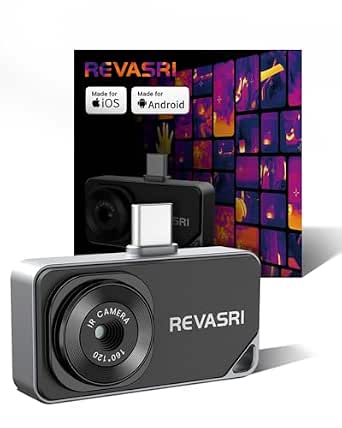 | Best for Rugged Everyday Use | Compatibility: iOS, Android, and Windows devices with USB-C | Resolution: 320 × 240 | Refresh rate: 25 Hz | VIEW LATEST PRICE | See Our Full Breakdown |
| FLIR ONE Pro Thermal Imaging Camera for iPhone 15 and Newer |  | Best Premium iPhone Pick | Compatibility: iPhone 15 and newer with USB-C | Native infrared resolution: 160 × 120 | Super Resolution: 480 × 360 | VIEW LATEST PRICE | See Our Full Breakdown |
| Thermal Master P4 Thermal Camera for Android | 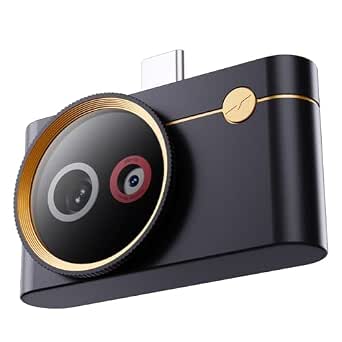 | Best for High-Range Inspections | IR resolution: 256 × 192 | Enhanced resolution: 512 × 384 | Thermal sensitivity: NETD <35 mK | VIEW LATEST PRICE | See Our Full Breakdown |
| TOPDON TC002C Duo USB-C Thermal Imaging Camera | 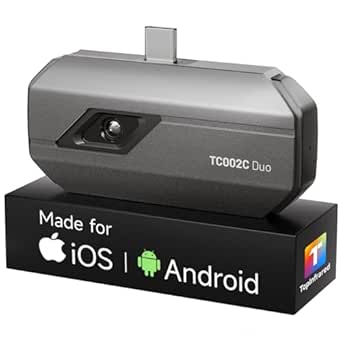 | Best for Cross-Platform USB-C Use | Thermal resolution: 256 × 192 | Enhanced resolution: 512 × 384 with TISR | Refresh rate: 25 Hz | VIEW LATEST PRICE | See Our Full Breakdown |
| Thermal Master P1 USB-C Thermal Camera, 160×120 IR |  | Best for Rugged, Lightweight Carry | IR resolution: 160 × 120 | Enhanced resolution: 320 × 240 | Thermal sensitivity: 0.04°C NETD | VIEW LATEST PRICE | See Our Full Breakdown |
| AMPBANK M192 USB-C Thermal Camera |  | Best for Alarm-Based Monitoring | Infrared resolution: 192 × 192 | Enhanced resolution: Up to 384 × 384; MED mode 240 × 240 | Thermal sensitivity: 40 mK | VIEW LATEST PRICE | See Our Full Breakdown |
| smartphone thermal camera lense | Temperature accuracy | Compatibility | Temperature range | Thermal sensitivity |
|---|---|---|---|---|
| FLIR ONE Thermal Imaging Camer | ±3°C or ±5% under specified conditions | USB-C iPhones, iPhone 15 and newer | — | — |
| Seek Thermal Nano 300 Thermal | ±5% | — | -4°F to 626°F (-20°C to 330°C) | <35 mK |
| Thermal Master P1 USB-C Therma | ±3.6°F | USB-C smartphones and computers; Lightning iPhones require a separate adapter | -20°C to 600°C (-4°F to 1112°F) | 0.04°C |
| REVASRI Thermal Camera for iPh | — | iOS, Android, and Windows devices with USB-C | -20°C to 450°C (-4°F to 842°F) | 40 mK |
| FLIR ONE Pro Thermal Imaging C | ±3°C or ±5% | iPhone 15 and newer with USB-C | — | — |
| Thermal Master P4 Thermal Came | ±3.6°F | Android and Windows | -4°F to 1112°F | NETD <35 mK |
| TOPDON TC002C Duo USB-C Therma | ±2°C or 2% | USB-C iOS, Android, and Windows devices; temporarily incompatible with Mac and Android 16 | -4°F to 1022°F | 40 mK |
| Thermal Master P1 USB-C Therma | ±2°C / ±3.6°F | — | -4°F to 1112°F (-20°C to 600°C) | 0.04°C NETD |
| AMPBANK M192 USB-C Thermal Cam | ±2°C or 2% | USB-C iOS, Android, and Windows devices; not compatible with Mac | -4°F to 842°F (-20°C to 450°C) | 40 mK |
More Details on Our Top Picks
FLIR ONE Thermal Imaging Camera for USB-C iPhones
The FLIR ONE is a strong fit for iPhone 15 and newer owners who want help turning thermal images into practical home checks. Its inspection guides cover tasks such as looking for air leaks and moisture, while MSX image enhancement overlays visible details to make heat patterns easier to place. Super Resolution outputs 240 × 180 images, but the underlying sensor is 80 × 60; compared with the FLIR ONE Pro, it has less native thermal detail, and the Seek Thermal Nano 300 provides 320 × 240 resolution without relying on that upscaling. The compact body is rated for drops up to 1.5 meters, a useful safeguard for occasional inspection work. The tradeoffs are its USB-C iPhone-only compatibility and lower native resolution, which make it a less flexible choice for multi-device users or detail-focused work.
Pros:- In-app inspection guides give homeowners a starting point for common checks
- MSX combines thermal and visible details to make image context easier to read
- Super Resolution outputs images at 240 × 180
- Rated to withstand drops from up to 1.5 meters
Cons:- Compatible only with USB-C iPhone 15 and newer models
- Native infrared resolution is 80 × 60, below the FLIR ONE Pro and 320 × 240 alternatives
- Temperature accuracy is specified as ±3°C or ±5% only under stated conditions
Best for: iPhone 15 and newer owners who want guided checks for drafts, moisture concerns, and other household inspection tasks.
Not ideal for: Android users, owners of Lightning iPhones, or buyers who want higher native resolution than 80 × 60.
- Compatibility:USB-C iPhones, iPhone 15 and newer
- Native infrared resolution:80 × 60
- Super Resolution:240 × 180
- Temperature accuracy:±3°C or ±5% under specified conditions
- Dimensions:2.6 × 1.3 × 0.6 inches
- Weight:1.28 ounces
- Battery:1 AA battery, included
Our verdict“Choose the FLIR ONE if guided home inspections and familiar FLIR image tools matter more than higher native resolution or broader phone compatibility.”
Seek Thermal Nano 300 Thermal Camera for iPhone with USB-C
The Seek Thermal Nano 300 prioritizes native 320 × 240 resolution, giving iPhone users more thermal image detail than the 80 × 60 sensor in the standard FLIR ONE. Its frame rate above 25 Hz supports smoother viewing of moving heat sources, while the 57° × 42° field of view covers a broad area for home checks or outdoor scanning. It records stills and video directly to a compatible phone, with a stated temperature range from -4°F to 626°F. Compared with the Thermal Master P1, the Nano 300 is limited to USB-C iPhones rather than also supporting USB-C Android phones and computers. Its main practical drawback is that it is not water resistant, so damp work areas and wet-weather use call for extra care. This is a focused choice for iPhone owners who value resolution over cross-platform flexibility.
Pros:- 320 × 240 resolution offers more native image detail than the standard FLIR ONE
- Frame rate over 25 Hz supports smoother thermal video
- Temperature range spans -4°F to 626°F
- Captures JPEG stills and MP4 video directly to a compatible iPhone
Cons:- Works only with USB-C iPhones, unlike the cross-platform Thermal Master P1
- Not water resistant
- Temperature accuracy is specified as ±5%
Best for: iPhone 15 and newer owners who want native 320 × 240 thermal imaging for home maintenance, electrical checks, or outdoor scanning.
Not ideal for: Android or computer users, and anyone who needs a camera suited to wet conditions.
- Resolution:320 × 240
- Frame rate:Over 25 Hz
- Temperature range:-4°F to 626°F (-20°C to 330°C)
- Temperature accuracy:±5%
- Thermal sensitivity:<35 mK
- Field of view:57° × 42°
- Connector and compatibility:USB-C; iPhones with USB-C connectors, iPhone 15 and newer
- Water resistance:Not water resistant
Our verdict“Pick the Nano 300 if you want high-resolution thermal images on a USB-C iPhone and can work around its lack of water resistance.”
Thermal Master P1 USB-C Thermal Camera for iOS and Android, 320 × 240 Resolution
The Thermal Master P1 stands apart from the iPhone-only Seek Thermal Nano 300 by supporting USB-C smartphones and computers, making it a more adaptable tool for buyers who switch between devices. Its 320 × 240 resolution, 25 Hz refresh rate, and broad -20°C to 600°C measurement range suit everything from household checks to hotter equipment inspections. At 0.62 ounces, it is also lighter than the listed FLIR ONE models, and the included case and extension cable help with storage and awkward phone placement. The 15× digital zoom and temperature alarms add useful ways to inspect a scene, though digital zoom does not add sensor detail. Compared with the REVASRI, the P1 lists a higher maximum temperature but does not specify water resistance or drop protection. Lightning iPhones need a separate adapter, so its broad compatibility still has limits.
Pros:- Works with USB-C smartphones and computers, unlike iPhone-only options
- 320 × 240 resolution and 25 Hz refresh rate support detailed, responsive viewing
- Measures from -20°C to 600°C for varied inspection tasks
- Lightweight body includes a case, extension cable, and temperature alarms
Cons:- Lightning iPhones require a separately sold adapter
- Listed continuous operation is 5–8 hours
- No water-resistance or drop-protection rating is provided
Best for: DIY inspectors, technicians, and hobbyists who want one lightweight thermal camera for USB-C phones and computers.
Not ideal for: Lightning iPhone owners who do not want to buy an adapter, or users who need stated water and drop protection.
- Resolution:320 × 240
- Refresh rate:25 Hz
- Temperature range:-20°C to 600°C (-4°F to 1112°F)
- Temperature accuracy:±3.6°F
- Thermal sensitivity:0.04°C
- Digital zoom:15×
- Compatibility:USB-C smartphones and computers; Lightning iPhones require a separate adapter
- Weight and dimensions:0.62 oz; 2.32 × 1.06 × 0.68 inches
- Continuous operation:5–8 hours
Our verdict“Choose the P1 if cross-device USB-C compatibility and a wide temperature range matter more than built-in protection ratings.”
REVASRI Thermal Camera for iPhone and Android, 320×240 Super IR Resolution
The REVASRI is the most protection-minded option in this group: its IP54 rating and 1-meter drop protection give it an advantage over the Seek Thermal Nano 300, which is explicitly not water resistant, and over the P1, which lists no protection rating. It pairs 320 × 240 imaging at 25 Hz with 40 mK sensitivity, temperature tracking, and high/low alarms. USB-C support across iOS, Android, and Windows also makes it more flexible than the iPhone-only FLIR ONE models. Its picture-in-picture visible-light mode can help relate a heat pattern to the scene, while 15× electronic zoom offers closer inspection without changing the sensor’s native resolution. The main tradeoff is a 450°C upper temperature limit, lower than the P1’s 600°C, and compatibility remains tied to USB-C devices; older phones may need an adapter.
Pros:- IP54 rating and 1-meter drop protection provide stated protection absent from some rivals
- 320 × 240 resolution at 25 Hz supports detailed, responsive thermal viewing
- Works with USB-C iOS, Android, and Windows devices
- Temperature alarms, tracking, and picture-in-picture mode support varied inspection needs
Cons:- Maximum temperature of 450°C is below the Thermal Master P1’s 600°C limit
- USB-C-only connection may require an adapter for older phones
- 15× zoom is electronic and does not increase native sensor resolution
Best for: USB-C phone, tablet, or computer users who inspect homes, vehicles, or equipment in conditions where basic water and drop protection is useful.
Not ideal for: People inspecting surfaces above 450°C, or owners of devices without USB-C who want a direct connection.
- Compatibility:iOS, Android, and Windows devices with USB-C
- Resolution:320 × 240
- Refresh rate:25 Hz
- Thermal sensitivity:40 mK
- Temperature range:-20°C to 450°C (-4°F to 842°F)
- Accuracy:±2°C or 2%
- Zoom and color modes:15× electronic zoom; 9 color modes
- Protection:IP54; 1-meter drop protection
- Power source:Powered by device via USB-C; no battery
Our verdict“Choose the REVASRI for cross-platform USB-C use with stated basic protection, but pick the P1 for higher-temperature inspections.”
FLIR ONE Pro Thermal Imaging Camera for iPhone 15 and Newer
The FLIR ONE Pro is the premium-focused choice for USB-C iPhone owners who want more native thermal detail than the standard FLIR ONE. Its 160 × 120 sensor feeds Super Resolution images at 480 × 360, while FLIR MSX adds visible scene detail to help interpret heat patterns. That combination makes it better suited to more demanding home, automotive, and industrial inspection work than the standard model’s 80 × 60 sensor and 240 × 180 output. It also shares the FLIR app’s inspection guides and a 1.5-meter drop rating. Compared with the Seek Thermal Nano 300, however, it remains limited to iPhone 15 and newer, and its native sensor resolution is lower than the Seek’s 320 × 240. Temperature accuracy is conditional, so this is a stronger fit for guided visual inspection than for buyers who need broad device support or stated precision across all conditions.
Pros:- 160 × 120 native sensor provides more thermal detail than the standard FLIR ONE
- Super Resolution outputs 480 × 360 images
- MSX and in-app inspection guides help interpret and document thermal findings
- Rated to withstand drops from up to 1.5 meters
Cons:- Compatible only with USB-C iPhone 15 and newer models
- Native resolution is below the 320 × 240 Seek Thermal Nano 300
- Temperature accuracy applies only under specified unit and scene conditions
Best for: iPhone 15 and newer owners who want FLIR’s image-enhancement tools and a higher-resolution sensor for regular home, automotive, or industrial inspections.
Not ideal for: Android users, owners of Lightning iPhones, or buyers who prioritize 320 × 240 native resolution and wider phone compatibility.
- Compatibility:iPhone 15 and newer with USB-C
- Native infrared resolution:160 × 120
- Super Resolution:480 × 360
- Temperature accuracy:±3°C or ±5%
- Accuracy operating conditions:Unit: 15°C–35°C; scene: 5°C–120°C
- Dimensions:2.6 × 1.3 × 0.6 inches
- Weight:1.29 ounces
- Battery:1 AA battery, included
- Drop protection:Rated for drops from up to 1.5 meters
Our verdict“Pick the FLIR ONE Pro if you want FLIR’s guided inspection workflow and enhanced imaging on a compatible iPhone, rather than the broadest compatibility or highest native resolution.”
Thermal Master P4 Thermal Camera for Android
The Thermal Master P4 is the strongest fit here for Android users who need to check both fine temperature differences and unusually hot equipment. Its 256 × 192 sensor, sub-35 mK sensitivity, and thermal-visible image fusion give more context than the lower-resolution Thermal Master P1, while its stated range reaches 1112°F. Hotspot tracking and 15× digital zoom can help locate a problem during HVAC, electrical, or automotive checks, though zoom cannot add detail the sensor did not capture. At 0.95 ounces, it is easy to carry, and phone power means there is no separate battery to charge. The tradeoff is compatibility: this pick is for Android and Windows, not iPhone users. Like every option here, it reads surface temperatures and cannot see through materials such as glass or walls.
Pros:- 256 × 192 infrared sensor with enhanced 512 × 384 output and visible-image fusion
- Sub-35 mK sensitivity helps reveal subtle temperature differences
- Wide -4°F to 1112°F measurement range with hotspot tracking
- Lightweight, phone-powered design with 15× digital zoom
Cons:- Compatibility is limited to Android and Windows devices
- Digital zoom does not increase the sensor’s native detail
- Cannot detect temperatures through materials that block infrared
Best for: Android or Windows users inspecting electrical, HVAC, or automotive equipment that may exceed the temperature range of more general-purpose phone cameras.
Not ideal for: iPhone owners or anyone needing to inspect through walls, glass, or other infrared-blocking materials.
- IR resolution:256 × 192
- Enhanced resolution:512 × 384
- Thermal sensitivity:NETD <35 mK
- Temperature range:-4°F to 1112°F
- Temperature accuracy:±3.6°F
- Refresh rate:25 Hz
- Field of view:56.0° × 42.2°
- Compatibility:Android and Windows
- Weight:0.95 oz
Our verdict“Choose the P4 if you use Android or Windows and want a sensitive phone-powered camera with a particularly broad inspection temperature range.”
TOPDON TC002C Duo USB-C Thermal Imaging Camera
The TOPDON TC002C Duo stands out for buyers who want one USB-C thermal camera to share across supported phones, tablets, and Windows devices. Its listed compatibility includes iOS, Android, and Windows, a broader platform mix than the Android-and-Windows-only Thermal Master P4. The 256 × 192 sensor, TISR-enhanced 512 × 384 output, and 25 Hz refresh rate suit routine inspections and thermal video capture; the enhanced output should not be confused with native sensor resolution. It can measure from up to 16.4 feet, which is useful when a target is awkward or unsafe to approach. The compromises are real: the stated temperature ceiling is lower than the P4 and Thermal Master P1, and the product is temporarily incompatible with Mac and Android 16 devices. Check device support before choosing it.
Pros:- Listed support for USB-C iOS, Android, and Windows devices
- TISR-enhanced output reaches 512 × 384 from a 256 × 192 sensor
- 25 Hz imaging supports thermal photos and video
- Can measure targets from up to 16.4 feet away
Cons:- Temporarily incompatible with Mac and Android 16 devices
- Temperature range tops out at 1022°F, below the P4 and P1
- Requires a compatible USB-C phone or tablet
Best for: People who want to move a USB-C thermal camera among supported iOS, Android, and Windows devices, and who need photo or video capture for routine inspections.
Not ideal for: Mac users, Android 16 users, or inspectors who need the higher temperature ceiling offered by the Thermal Master P4 or P1.
- Thermal resolution:256 × 192
- Enhanced resolution:512 × 384 with TISR
- Refresh rate:25 Hz
- Thermal sensitivity:40 mK
- Temperature range:-4°F to 1022°F
- Temperature accuracy:±2°C or 2%
- Measurement distance:Up to 16.4 ft (5 m)
- Weight:1.1 oz (30 g)
- Compatibility:USB-C iOS, Android, and Windows devices; temporarily incompatible with Mac and Android 16
Our verdict“Pick the TC002C Duo if broad supported USB-C device compatibility and capture features matter more than the P4’s higher temperature ceiling.”
Thermal Master P1 USB-C Thermal Camera, 160×120 IR
For buyers who value a camera they can keep in a work bag, the Thermal Master P1 pairs a 0.6-ounce body with IP54 protection and stated one-meter drop protection. Its 160 × 120 infrared sensor is lower-resolution than the 256 × 192 sensors in the P4 and TOPDON TC002C Duo, so it is better suited to locating broad hot or cold areas than reading fine thermal detail. Enhanced output reaches 320 × 240, and the 15× zoom and 52° × 39° field of view provide useful framing options, but neither changes the native sensor resolution. The P1 reaches 1112°F, matching the P4’s upper range, and includes a 19-inch extension cable for positioning the phone away from the camera. It is a practical compact pick, with compatibility tied to supported USB-C devices.
Pros:- Very light 0.6-ounce design with IP54 protection and stated one-meter drop protection
- Measures across a broad -4°F to 1112°F range
- 15× zoom and a 52° × 39° field of view help frame inspection targets
- Includes a 19-inch extension cable and carrying case
Cons:- 160 × 120 native resolution is lower than the P4 and TC002C Duo
- Enhanced 320 × 240 output does not replace native sensor detail
- Requires a compatible USB-C device
Best for: Field technicians and DIY inspectors who want a very lightweight, protected USB-C camera for locating broad temperature patterns during routine checks.
Not ideal for: Buyers who need finer native thermal detail or who cannot confirm their USB-C phone, tablet, or Windows device is supported.
- IR resolution:160 × 120
- Enhanced resolution:320 × 240
- Thermal sensitivity:0.04°C NETD
- Temperature range:-4°F to 1112°F (-20°C to 600°C)
- Temperature accuracy:±2°C / ±3.6°F
- Refresh rate:25 Hz
- Field of view:52° × 39°
- Protection:IP54; stated one-meter drop protection
- Weight:0.6 oz
Our verdict“Choose the P1 if low weight and added physical protection matter more than the finer native resolution of the P4 or TC002C Duo.”
AMPBANK M192 USB-C Thermal Camera
The AMPBANK M192 is the most tailored option here for users who want alerts and post-inspection analysis rather than the broadest temperature coverage. Its high- and low-temperature alarms, 10 color palettes, PC analysis software, and Excel data export support repeat checks where recorded readings matter. The 192 × 192 sensor sits between the 160 × 120 Thermal Master P1 and the 256 × 192 P4 and TOPDON TC002C Duo on native pixel count; selectable enhanced modes reach 384 × 384, though the selected mode and device affect the result. Its 25 Hz refresh rate matches those alternatives, but its upper limit of 842°F is lower than the P1 and P4. It also lacks the P1’s stated IP54 protection. Compatibility excludes Mac, so confirm the host device before buying.
Pros:- High- and low-temperature alarms support threshold-based monitoring
- Includes PC analysis software and Excel data export
- Selectable enhanced-resolution modes reach 384 × 384
- Compact 1.06-ounce design includes a case, cleaning cloth, and extension cable
Cons:- Not compatible with Mac
- 842°F upper limit is below the P1 and P4
- Enhanced resolution varies by device and selected mode
Best for: USB-C device owners who monitor temperature thresholds repeatedly and want alarms, PC analysis, or exported readings for records.
Not ideal for: Mac users or inspectors working with targets hotter than 842°F who would benefit from the P1 or P4’s broader upper range.
- Infrared resolution:192 × 192
- Enhanced resolution:Up to 384 × 384; MED mode 240 × 240
- Thermal sensitivity:40 mK
- Temperature range:-4°F to 842°F (-20°C to 450°C)
- Temperature accuracy:±2°C or 2%
- Refresh rate:25 Hz
- Color palettes:10
- Compatibility:USB-C iOS, Android, and Windows devices; not compatible with Mac
- Weight:1.06 oz (30 g)
Our verdict“Choose the M192 if temperature alarms and exported inspection data are more useful to you than a higher heat ceiling or Mac compatibility.”
How We Picked
I ranked these smartphone thermal camera lenses by the factors that most affect real buying decisions: stated thermal resolution, phone and connector compatibility, portability, product positioning, and the likely ease of using the camera with a phone. I gave extra weight to options whose listed specifications support a broader range of users, while distinguishing models aimed at a specific phone family or platform. A higher resolution can support clearer thermal imagery, but sensor resolution alone does not establish measurement accuracy, sensitivity, or performance in every setting.
The order reflects versatility and buyer fit, not a claim that every model has been independently tested. The Thermal Master P1 320 × 240 leads for its stated resolution and iOS/Android positioning; FLIR ONE Pro ranks as a more focused premium iPhone pick, while the other options serve narrower needs such as a compact form, Android use, or a lower-resolution entry point. I also treated compatibility uncertainty as a meaningful drawback: buyers should verify their phone model, connector, operating-system version, and required app before choosing.
| smartphone thermal camera lense | Temperature accuracy |
|---|---|
| FLIR ONE Thermal Imaging Camer | ±3°C or ±5% under specified conditions |
| Seek Thermal Nano 300 Thermal | ±5% |
| Thermal Master P1 USB-C Therma | ±3.6°F |
| REVASRI Thermal Camera for iPh | — |
| FLIR ONE Pro Thermal Imaging C | ±3°C or ±5% |
| Thermal Master P4 Thermal Came | ±3.6°F |
| TOPDON TC002C Duo USB-C Therma | ±2°C or 2% |
| Thermal Master P1 USB-C Therma | ±2°C / ±3.6°F |
| AMPBANK M192 USB-C Thermal Cam | ±2°C or 2% |
Factors to Consider When Choosing Smartphone Thermal Camera Lenses
Before comparing feature lists, I would narrow the choice by phone compatibility and the job you need to do. These cameras share a basic plug-in format, but connector support, app requirements, image detail, and inspection workflow can change whether a particular model is useful day to day.
Match the Camera to Your Exact Phone
Start with your phone’s model, port, and operating-system version, not just the label “USB-C” or “for iPhone.” Phone makers can change connector and software support across generations, and an app that installs may still lack full support for a particular camera. Check the manufacturer’s compatibility list and app requirements before ordering, especially if you use a newer iPhone or a less common Android model. If you switch phones often, a cross-platform model may be more useful than a device tied to one phone family. That flexibility can come with compromises in physical fit, app experience, or supported features. A short compatibility check can prevent buying a camera that cannot connect to your main phone.
Read Resolution Claims in Context
Thermal resolution affects how much spatial detail appears in the image, which can help when locating a small hot spot or comparing nearby components. It does not tell the whole story: image processing, focus, viewing distance, and the target’s surface all influence what you can interpret. Do not confuse a processed or “super resolution” label with the camera’s native sensor resolution unless the manufacturer explains the distinction. For broad checks such as finding a warm patch on a wall, a lower-resolution model may be enough; small electrical or mechanical targets usually call for more detail. Compare the exact model numbers, since similar product names can refer to different sensor specifications. Choose for the size of the objects you inspect, not for a number alone.
Separate Image Quality From Measurement Accuracy
A thermal image can show relative temperature patterns without making every displayed temperature a dependable measurement. Accuracy depends on setup and target conditions, including emissivity, distance, reflected heat, and whether the surface is shiny. For electrical, HVAC, or building work where readings inform a decision, look for clear documentation of measurement range, accuracy, emissivity settings, and any calibration guidance. A sharper image is helpful for locating a pattern, but it does not automatically make the temperature reading more trustworthy. Avoid treating a phone attachment as a replacement for a qualified inspection or other required safety procedures. If your work depends on documented readings, prioritize measurement controls and reporting features over compactness alone.
Check the App and Inspection Workflow
The app is part of the camera, not a minor extra. Before buying, find out whether it supports still images, video, temperature readouts, adjustable emissivity, palettes, and the file formats or reports you need. A camera that produces a clear live view may still be a poor fit if saving, sharing, or reviewing images is awkward. Check whether the app requires an account, a network connection, or permissions that affect how you work. For occasional home troubleshooting, a simple interface may matter more than advanced analysis tools. For repeat inspections, time spent organizing and exporting images can outweigh a small difference in sensor specifications.
Choose Form Factor for the Way You Work
Small plug-in cameras are easy to carry and can be convenient for quick checks, but their position can affect how comfortably you hold the phone and aim at a target. A compact attachment may be less pleasant when you need to inspect overhead, reach into a tight space, or take repeated images. Consider whether the camera blocks other phone accessories, makes the phone awkward to grip, or needs a case removed. Think about protection and storage too: a lens exposed in a tool bag may need more care than a camera kept in a dedicated case. Buyers who inspect for long periods should weigh handling and cable or connector strain alongside image features. Portability is useful only if the setup remains practical during the task.
Pay for the Capabilities Your Jobs Require
Higher-end models make the most sense when their image detail, measurement controls, app tools, or support fit recurring work. For occasional checks around the home, a simpler camera may cover the task without adding features you will rarely use. Conversely, choosing the least capable option can become frustrating if you need to inspect small targets or save repeatable records. Compare what is actually specified for each model rather than assuming a premium label means every capability is stronger. Also account for the phone you plan to keep using: a camera that works only with one platform may have a shorter useful life if you change phones. Spend more for a defined workflow advantage, not for a vague promise of “professional” results.
Frequently Asked Questions
Will a USB-C thermal camera work with every USB-C phone?
No. A matching connector does not guarantee that the phone supports the camera’s required data connection, operating-system version, or companion app. Check the camera maker’s compatibility list for your exact phone model, then confirm the app is available and supports your software version. Some phone cases or accessories can also interfere with a snug connection. If you rely on the camera for work, verify compatibility before buying rather than assuming the port settles the question.
Is a 320 × 240 camera always the better choice than a 160×120 model?
Not always; it depends on the size of the target and the detail you need to distinguish. Higher stated resolution can make small thermal patterns easier to see, while a lower-resolution camera may be adequate for broad checks such as finding a warm area on a wall. Resolution does not establish temperature accuracy or replace good inspection technique. Compare sensor specifications and image-processing claims carefully, since “super resolution” language may refer to processed output rather than native sensor detail. Choose based on your usual inspection distance and target size.
Can I use a smartphone thermal camera to diagnose an electrical or building problem?
It can help reveal temperature patterns that point to an area worth investigating, but a thermal image alone does not identify the cause of a fault. Reflective surfaces, insulation, airflow, load conditions, and viewing angle can all affect what appears on screen. For electrical work, follow safe procedures and use a qualified professional when the issue or measurement is beyond your training. Building inspections may also require other tools or methods to confirm what the thermal image suggests. Treat the camera as an inspection aid, not a stand-alone diagnosis.
Should I choose a camera made for iPhone or one that supports both iOS and Android?
Choose based on the phone you will actually use and how likely you are to change platforms. An iPhone-focused model can be a sensible fit if its listed phone compatibility matches your device and its app supports your workflow. A cross-platform option can offer more flexibility for households or teams with mixed phones, but you still need to check each device and connector. Do not assume a camera that works with one USB-C phone will work with every USB-C phone. If phone changes are common, platform flexibility deserves more weight than a small convenience advantage.
What should I check if I need reliable temperature readings rather than just thermal images?
Look beyond resolution and check the manufacturer’s stated measurement accuracy, temperature range, emissivity controls, and guidance for calibration and use. Surface material and reflected heat can skew readings, especially on shiny metal, so learn how the camera handles those conditions before relying on a number. Ask whether the app lets you set emissivity and record the relevant measurement details. For regulated or safety-critical work, confirm that the device suits the required procedure and standards. If those details are not clearly documented, treat the camera as a visual screening tool rather than a measurement instrument for decisions that carry risk.
Conclusion
For most buyers, I would start with the Thermal Master P1 320 × 240 as the best overall pick, provided its compatibility list matches your phone. The Thermal Master P1 160×120 is the lineup’s more basic resolution option and may suit simpler checks, but verify the exact model before purchasing; I would not call it the best value without confirmed current pricing and feature details. For a best premium direction, the FLIR ONE Pro is the clearest choice for buyers who want an iPhone-focused FLIR model, while the Seek Thermal Nano 300 is worth a look if a compact attachment is your priority. Beginners should choose the model with the clearest phone support and easiest app workflow, rather than buying on resolution alone; the REVASRI 320×240 is another option to compare for a higher-resolution, cross-platform setup. For Android-specific use, compare the Thermal Master P4 with the TOPDON TC002C Duo and confirm each phone’s support; choose the FLIR ONE Thermal Imaging Camera for USB-C iPhones only if its compatibility matches your device. Before deciding, verify the exact phone, connector, app, and measurement capabilities you need.
Fall Picks
fall essentials
As an affiliate, we earn on qualifying purchases.