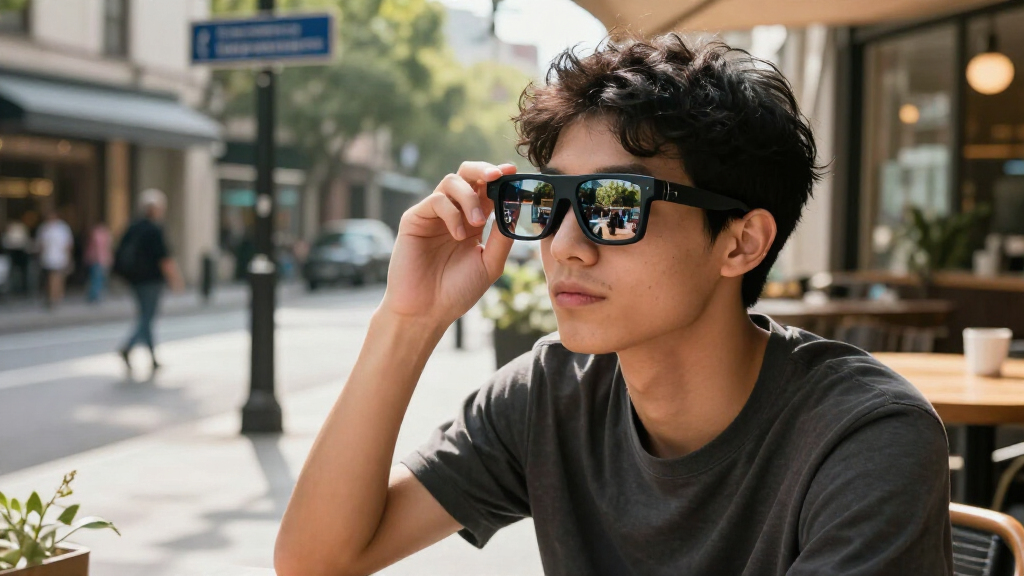

Augmented reality smart glasses range from screen-focused glasses for movies and games to lightweight models built around translation and teleprompter tools. In this lineup, I rank the XREAL One Pro as the best overall for its native 3DoF tracking and high-refresh display; the XREAL 1S stands out for spatial features, while the INMO GO3 suits buyers who prioritize translation and prompts over a cinema-sized screen. The main tradeoffs are display quality versus everyday wearability, spatial tracking versus simplicity, and entertainment features versus practical smart-glass functions. Similar product names can also hide meaningful differences in display claims and included hardware. Read on for the full comparison and advice on choosing glasses that fit your devices and daily use.

Get the latest gadgets delivered free with Prime
- Fast, free delivery on millions of items
- Prime Video, Amazon Music and more included
- Member-only deals all year
Complete the kit


Key Takeaways
- XREAL One Pro leads the screen-focused picks by combining a 171-inch virtual-display claim, 120Hz refresh, and native 3DoF; its higher feature set makes it a better fit for buyers who will use spatial tracking, not just watch video.
- XREAL 1S also has native 3DoF, so tracking capability is not exclusive to the premium pick; compare its specific display and device support before choosing between the two.
- The two RayNeo Air 4 Pro listings appear closely related, while the RayNeo Air 3s is a separate option; verify exact model and included accessories rather than relying on near-matching names or screen-size claims.
- INMO GO3 and the other AI translation and teleprompter glasses serve a different purpose from the video-focused models: prioritize them for prompts and translation, not for a large virtual cinema.
- DOMARS and Rokid Max2 with Station2 highlight multi-screen spatial viewing, but buyers should check whether the extra computer or accessory is part of the package and compatible with their intended setup.
| INMO GO3 Smart Glasses with AI Translation and Teleprompter |  | Best for Translation and Presentations | Display: Dual-eye monochrome LED | Maximum display brightness: 1500 nit | Translation languages: 98 | VIEW LATEST PRICE | See Our Full Breakdown |
| AI Smart Glasses with AR Display, Real-Time Translation, and Teleprompter |  | Best Lightweight Option for Short Sessions | Display: 1.5-inch AMOLED | Weight: 40 g | Battery capacity: 183 mAh | VIEW LATEST PRICE | See Our Full Breakdown |
| RayNeo Air 4 Pro AR/XR Glasses with HDR10 Display |  | Best for Plug-and-Play Media Viewing | Virtual display size: 201 inches | Display: HDR10 | Refresh rate: 120 Hz | VIEW LATEST PRICE | See Our Full Breakdown |
| XREAL 1S AR Glasses with X1 Chip and Native 3DoF |  | Best for Spatial Screen Control | Display: OLED | Maximum resolution: 1920 × 1200 | Refresh rate: Up to 120 Hz in 3DoF mode | VIEW LATEST PRICE | See Our Full Breakdown |
| RayNeo Air 4 Pro AR Glasses with HDR10, 201-Inch Virtual Display, and 120Hz Refresh Rate |  | Best for 3D Media and Console Gaming | Brand and model: RayNeo XRGF39-1 | Virtual display size: 201 inches | Maximum resolution: 819 × 461 | VIEW LATEST PRICE | See Our Full Breakdown |
| XREAL One Pro AR Glasses with X1 Chip, 171″ 120Hz FHD Display, Native 3DoF | 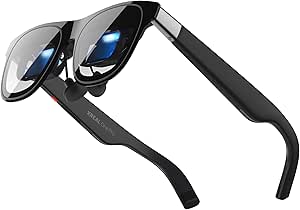 | Best for Spatial Tracking | Chip: X1 Spatial Computing Chip | Tracking: Native 3DoF; optional 6DoF with XREAL Eye | Display: Sony 0.55-inch Micro-OLED, Full HD | VIEW LATEST PRICE | See Our Full Breakdown |
| VITURE Beast XR/AR Glasses, 1200p Micro-OLED Display |  | Best for Brightness and Fit Options | Display: Sony Micro-OLED | Resolution: 1200p per eye | Virtual screen: 174 inches | VIEW LATEST PRICE | See Our Full Breakdown |
| DOMARS AR/XR Video Glasses with 3-Screen Spatial Display |  | Best for Multi-Screen Work | Display: Micro-OLED | Resolution: 1920 × 1200 | Refresh rate: 120Hz in description; 160Hz in specifications | VIEW LATEST PRICE | See Our Full Breakdown |
| XREAL One Pro AR Glasses with X1 Chip, 171-Inch 120Hz Display and Native 3DoF | | Best for Low-Latency Gaming | Chip: XREAL X1 | Tracking: Native 3DoF; optional 6DoF with XREAL Eye | Motion-to-photon latency: 3 ms | VIEW LATEST PRICE | See Our Full Breakdown |
| RayNeo Air 3s AR/XR Smart Glasses – 201‑inch 120 Hz FHD HueView Display for Movies & Games |  | Best for Color-Rich Entertainment | Display: OLED HueView | Resolution: 1920 × 1080 | Virtual screen: 201 inches | VIEW LATEST PRICE | See Our Full Breakdown |
| Rokid Max2 AR Spatial Video Glasses with 3-Screen Display and Station2 Spatial Computer |  | Best for Standalone Multitasking | Display: Micro OLED | Resolution: 1920 × 1200 | Refresh rate: 120Hz | VIEW LATEST PRICE | See Our Full Breakdown |
| augmented reality smart glasse | Display | Refresh rate | Connectivity | Weight |
|---|---|---|---|---|
| INMO GO3 Smart Glasses with AI | Dual-eye monochrome LED | — | Bluetooth | 53 g |
| AI Smart Glasses with AR Displ | 1.5-inch AMOLED | — | — | 40 g |
| RayNeo Air 4 Pro AR/XR Glasses | HDR10 | 120 Hz | USB Type-C | 2.72 ounces |
| XREAL 1S AR Glasses with X1 Ch | OLED | Up to 120 Hz in 3DoF mode | USB-C DisplayPort | — |
| RayNeo Air 4 Pro AR Glasses wi | HDR10 | 120 Hz | USB-C | 2.88 ounces |
| XREAL One Pro AR Glasses with | Sony 0.55-inch Micro-OLED, Full HD | 120Hz | USB-C video input | — |
| VITURE Beast XR/AR Glasses | Sony Micro-OLED | 120Hz | — | 88 g |
| DOMARS AR/XR Video Glasses wit | Micro-OLED | 120Hz in description; 160Hz in specifications | Wi-Fi, Bluetooth, USB Type-C, and wireless screen mirroring | 75 g |
| XREAL One Pro AR Glasses with | — | 120Hz | USB-C devices with video output | — |
| RayNeo Air 3s AR/XR Smart Glas | OLED HueView | 120Hz | — | — |
| Rokid Max2 AR Spatial Video Gl | Micro OLED | 120Hz | Wi-Fi 6; Bluetooth 5.2 | — |
More Details on Our Top Picks
INMO GO3 Smart Glasses with AI Translation and Teleprompter
The INMO GO3 is the most communication-focused pick here: its display can surface translation across 98 languages, captions, navigation cues, and an invisible teleprompter, while an 8MP camera and AI meeting assistant add tools for work conversations. Two included replaceable batteries help offset the stated runtime of up to eight hours, making it more suitable for a full day of intermittent use than the second AI glasses option, which lists only 2.5 hours. Its dual-eye monochrome LED display is designed for information, not the large, cinematic image offered by the RayNeo Air 4 Pro. The tradeoff is a heavier 53 g frame, no water resistance, and no GPS geotagging. I’d choose it for language support and prompts, not as a media-viewing headset.
Pros:- Supports real-time translation in 98 languages, with live captions also available.
- Combines an invisible teleprompter, navigation, and an AI meeting assistant.
- Two replaceable batteries are included, with stated battery life of up to eight hours.
- Includes an 8MP HD camera.
Cons:- At 53 g, it is heavier than the 40 g AI translation glasses in this lineup.
- Not water resistant, limiting use in rain or during sweaty outdoor activity.
- No GPS geotagging for camera images.
Best for: Travelers, multilingual professionals, and presenters who want translation, captions, or discreet speaking prompts in their glasses.
Not ideal for: Buyers seeking an immersive movie or gaming display, water-resistant eyewear, or GPS-tagged camera photos.
- Display:Dual-eye monochrome LED
- Maximum display brightness:1500 nit
- Translation languages:98
- Camera:8MP HD
- Battery life:Up to 8 hours
- Included batteries:2 replaceable batteries
- Weight:53 g
- Connectivity:Bluetooth
Our verdict“Choose the INMO GO3 if translation and presentation aids matter more than a theater-sized virtual screen.”
AI Smart Glasses with AR Display, Real-Time Translation, and Teleprompter
At 40 g, these AI smart glasses are the lightest choice in this five-product group and bring translation, notifications, navigation prompts, and teleprompter scripts into a compact frame. Built-in GPS and water-repellent construction give them practical advantages over the INMO GO3, which is heavier and not water resistant. They also pair with both iOS and Android and support online or offline functionality, though their features rely on the INMO Go App. The main compromise is endurance: the listed 2.5-hour battery life makes them a short-session tool rather than an all-day companion, especially beside the GO3 and its two replaceable batteries. The 1.5-inch AMOLED display suits glanceable prompts and cues, but these are not the pick for extended media viewing.
Pros:- Lightweight 40 g frame is lighter than the INMO GO3.
- 1.5-inch AMOLED display supports translations, prompts, notifications, and navigation cues.
- Built-in GPS and water-repellent frame add practical outdoor utility.
- Supports voice control and Bluetooth pairing with iOS and Android.
Cons:- Listed battery life is only 2.5 hours.
- Feature access requires the INMO Go App.
- Limited battery capacity of 183 mAh may not suit long workdays or trips.
Best for: Presenters and commuters who want lightweight prompts, translation, and GPS navigation cues for brief outings or work sessions.
Not ideal for: Frequent travelers or all-day users who need long battery life, and buyers who prefer glasses features that do not depend on a companion app.
- Display:1.5-inch AMOLED
- Weight:40 g
- Battery capacity:183 mAh
- Battery life:2.5 hours
- Frame materials:Nylon and polycarbonate
- Water resistance:Water repellent
- Connectivity and controls:Bluetooth, gesture input, and microphone
- Navigation:Built-in GPS
Our verdict“Pick these for lightweight, app-linked prompts and navigation during shorter sessions, not for all-day use.”
RayNeo Air 4 Pro AR/XR Glasses with HDR10 Display
The RayNeo Air 4 Pro takes a different approach from the translation-oriented INMO GO3: it acts as a personal screen for compatible devices, projecting a 201-inch virtual display with HDR10, 120Hz refresh, and 3D viewing support. Four Bang & Olufsen-tuned open-ear speakers provide audio without requiring a separate headset, while USB-C connection avoids the need for onboard Wi-Fi, apps, or a battery. That simplicity is useful for movies and gaming, but it also means the glasses depend on a compatible connected device and are not standalone AR wearables. Compared with the XREAL 1S, the RayNeo has a smaller stated virtual screen and does not list native 3DoF spatial modes. It is a straightforward media pick, not the better choice for anchored screens or hands-free assistance.
Pros:- HDR10, 120Hz refresh, and 3D support make the virtual screen suited to video and gaming.
- Four Bang & Olufsen-tuned open-ear speakers are built in.
- USB-C plug-and-play operation requires no Wi-Fi, internal battery, or apps.
- Compatible with a range of phones, tablets, computers, and gaming devices.
Cons:- Requires a compatible USB-C device to provide the image.
- No internal battery, Wi-Fi, or apps for standalone use.
- Optional Sound Tube accessory is sold separately.
Best for: Phone, laptop, and handheld-console users who want a lightweight personal display for movies, games, and 3D viewing.
Not ideal for: Buyers who need standalone smart-glasses functions, native spatial anchoring, or a screen that works without a compatible USB-C device.
- Virtual display size:201 inches
- Display:HDR10
- Refresh rate:120 Hz
- 3D viewing:Supported
- Audio:Four Bang & Olufsen-tuned speakers
- Connectivity:USB Type-C
- Weight:2.72 ounces
- Internal battery:None
Our verdict“Choose the RayNeo Air 4 Pro for simple USB-C media viewing, but choose the XREAL 1S for native spatial viewing modes.”
XREAL 1S AR Glasses with X1 Chip and Native 3DoF
The XREAL 1S is the spatial-viewing specialist in this batch. Its native 3DoF anchor mode can keep a virtual screen positioned in space, while 0DoF follow mode offers a simpler view that moves with the wearer. The OLED display reaches 1920 × 1200 resolution and up to 120Hz in 3DoF mode, with on-glasses 3D conversion adding flexibility for compatible content. This gives it more spatial control than either RayNeo Air 4 Pro, which centers on a fixed virtual display and USB-C media playback. The tradeoff is setup dependence: a compatible USB-C DisplayPort source is required, and 6DoF anchoring needs the separate XREAL Eye accessory. Its 52-degree field of view is also narrower than the headline screen size may suggest.
Pros:- Native 3DoF anchor mode offers spatial screen positioning without an added accessory.
- OLED resolution up to 1920 × 1200 and refresh rates up to 120Hz in 3DoF mode.
- Supports on-glasses 3D conversion and multiple spatial viewing modes.
- Bose-tuned open-ear audio is built into the glasses.
Cons:- Requires a device with USB-C DisplayPort output.
- 6DoF anchoring requires the separate XREAL Eye accessory.
- 52-degree field of view may feel less expansive than the virtual screen size suggests.
Best for: Users who want to anchor a virtual screen in place for gaming, media, or supported spatial workflows and have a compatible USB-C DisplayPort device.
Not ideal for: Buyers seeking standalone glasses, broad device compatibility without DisplayPort, or full 6DoF anchoring without buying an accessory.
- Display:OLED
- Maximum resolution:1920 × 1200
- Refresh rate:Up to 120 Hz in 3DoF mode
- Virtual screen size:Up to 500 inches
- Field of view:52 degrees
- Connectivity:USB-C DisplayPort
- Spatial viewing:0DoF follow mode, native 3DoF anchor mode, and 6DoF anchoring with XREAL Eye
- Audio:Bose-tuned open-ear audio
Our verdict“Choose the XREAL 1S if spatial screen anchoring matters more than the simpler plug-and-play media focus of the RayNeo Air 4 Pro.”
RayNeo Air 4 Pro AR Glasses with HDR10, 201-Inch Virtual Display, and 120Hz Refresh Rate
This RayNeo Air 4 Pro listing is aimed squarely at 3D movies and smooth gaming: it combines a 201-inch virtual screen, HDR10, 120Hz refresh, and native 3D support with four built-in Bang & Olufsen speakers. Like the other RayNeo Air 4 Pro in this lineup, it uses USB-C rather than apps or Wi-Fi, so setup stays simple when the source device is compatible. Against the XREAL 1S, it gives up native spatial anchoring and the XREAL’s higher listed resolution, but offers a direct media-first setup without spatial mode choices. The provided maximum resolution is 819 × 461, a specification buyers should weigh carefully alongside the 201-inch screen claim. It also depends on a compatible USB-C device, so it is not a standalone AR system.
Pros:- Supports HDR10, 120Hz visuals, and native 3D movies.
- Four Bang & Olufsen speakers are integrated into the glasses.
- USB-C connection supports direct use with compatible phones, computers, handheld consoles, and PlayStation consoles.
- Does not require Wi-Fi or apps for the stated viewing setup.
Cons:- Requires a compatible USB-C device and is not a standalone AR headset.
- Listed maximum resolution is 819 × 461.
- Optional Sound Tube accessory is sold separately.
Best for: Console and handheld gamers or film viewers who prioritize 120Hz playback, 3D content, and built-in open-ear audio.
Not ideal for: Buyers who want native 3DoF screen anchoring, standalone operation, or a higher explicitly listed resolution.
- Brand and model:RayNeo XRGF39-1
- Virtual display size:201 inches
- Maximum resolution:819 × 461
- Refresh rate:120 Hz
- Display:HDR10
- Connectivity:USB-C
- Weight:2.88 ounces
- Audio:Four Bang & Olufsen speakers
Our verdict“Choose this RayNeo listing for USB-C 3D media and gaming, but favor the XREAL 1S if spatial anchoring or higher listed resolution is your priority.”
XREAL One Pro AR Glasses with X1 Chip, 171″ 120Hz FHD Display, Native 3DoF
I’d choose the XREAL One Pro for buyers who want spatial tracking built into the glasses rather than relying on a separate computing unit. Its X1 chip and native 3DoF can keep a virtual screen positioned as you move your head, making it a stronger fit for anchored viewing than the RayNeo Air 3s, whose supplied details emphasize display and entertainment features instead. The 120Hz Micro-OLED display, 57° field of view, and Bose-tuned audio also make it well suited to games and films from a compatible USB-C device. The tradeoff is that this is not a standalone headset: video comes from an external source, and 6DoF requires the optional XREAL Eye. I’d pick the VITURE Beast instead if higher stated peak brightness matters more than XREAL’s tracking setup.
Pros:- Native 3DoF tracking is built into the glasses
- 120Hz Full HD Micro-OLED display with a 57° field of view
- Bose-tuned audio is integrated into the frame
- Adjustable IPD options and electrochromic lens dimming support a more adaptable fit and viewing setup
Cons:- Requires a compatible external USB-C video source
- 6DoF anchoring depends on the optional XREAL Eye
- Peak brightness is listed at up to 700 nits, below the VITURE Beast’s stated 1250 nits
Best for: USB-C handheld-console and laptop owners who want native 3DoF screen anchoring for gaming or private viewing
Not ideal for: Buyers seeking a self-contained headset or full 6DoF tracking without buying an additional accessory
- Chip:X1 Spatial Computing Chip
- Tracking:Native 3DoF; optional 6DoF with XREAL Eye
- Display:Sony 0.55-inch Micro-OLED, Full HD
- Virtual screen:171 inches
- Refresh rate:120Hz
- Field of view:57°
- Brightness:Up to 700 nits
- Connectivity:USB-C video input
Our verdict“Choose the XREAL One Pro if built-in 3DoF anchoring matters more to you than standalone operation or optional-accessory-free 6DoF.”
VITURE Beast XR/AR Glasses, 1200p Micro-OLED Display
The VITURE Beast stands out for pairing a high stated brightness ceiling with a lightweight frame and several fit adjustments. Its 1200p-per-eye Micro-OLED display, 120Hz refresh rate, and 58° field of view make it a capable choice for detailed video and games; the stated 1250-nit peak brightness gives it an advantage on paper over the XREAL One Pro’s 700-nit maximum. Built-in 3DoF and screen-positioning options add spatial viewing without the optional tracking accessory the XREAL needs for 6DoF. At 88 g, it is heavier than the 75 g DOMARS glasses, though the adjustable arms, nose pads, and prescription-ready design may make fit more flexible. Multi-screen features depend on compatible software and devices, so I’d skip it if you want every spatial feature to work independently of an app ecosystem.
Pros:- 1200p resolution per eye and 120Hz refresh rate
- Stated peak brightness of 1250 nits
- Built-in 3DoF, screen positioning, and electrochromic dimming
- Adjustable arms, interchangeable nose pads, and prescription-ready design
Cons:- Multi-screen use depends on compatible devices and software
- At 88 g, it weighs more than the 75 g DOMARS option
- Its brightness advantage is based on the supplied specifications, not comparative independent testing
Best for: Viewers who prioritize a bright display, adjustable fit, and built-in 3DoF for use with supported phones or computers
Not ideal for: Buyers who need a guaranteed multi-screen workspace across any device or want the lightest option in this group
- Display:Sony Micro-OLED
- Resolution:1200p per eye
- Virtual screen:174 inches
- Field of view:58°
- Refresh rate:120Hz
- Peak brightness:1250 nits
- Tracking:Built-in 3DoF
- Weight:88 g
Our verdict“Pick the VITURE Beast if a bright, adjustable 3DoF display matters more than the DOMARS glasses’ lower stated weight.”
DOMARS AR/XR Video Glasses with 3-Screen Spatial Display
The DOMARS AR/XR glasses are the clearest choice here for buyers who want several virtual work areas rather than one large screen. With the spatial station, they support a three-screen layout and 3DoF viewing, a workflow that goes beyond the single-screen emphasis of the XREAL One Pro and VITURE Beast. The 75 g frame is also the lightest listed in this batch, and built-in myopia adjustment from 0 to -6.00D may suit people who would otherwise need corrective lenses. The catch is that the multi-screen experience depends on the spatial station, so the glasses alone do not deliver that main advantage. I’d also treat the specifications cautiously: the supplied information conflicts on refresh rate and field of view, listing both 120Hz and 160Hz, and 50° and 600°.
Pros:- Spatial station enables a three-screen layout
- 3DoF support can keep the virtual display anchored in space
- Listed weight of 75 g is the lowest among these five glasses
- Built-in myopia adjustment covers 0 to -6.00D
Cons:- Three-screen use requires the spatial station
- Supplied specifications conflict on refresh rate and field of view
- The listed battery capacity and onboard storage do not establish standalone runtime or app capability
Best for: Multitaskers who want a portable three-screen workspace and are willing to use the included spatial station
Not ideal for: Buyers who need consistent, clearly verified display specifications or want multi-screen use without a separate station
- Display:Micro-OLED
- Resolution:1920 × 1200
- Refresh rate:120Hz in description; 160Hz in specifications
- Field of view:50° in description; 600° in specifications
- Spatial display:Three-screen layout with 3DoF; requires spatial station
- Weight:75 g
- Myopia adjustment:0 to -6.00D
- Connectivity:Wi-Fi, Bluetooth, USB Type-C, and wireless screen mirroring
Our verdict“Choose DOMARS for station-powered three-screen multitasking, but avoid it if reliable, internally consistent specifications are a priority.”
XREAL One Pro AR Glasses with X1 Chip, 171-Inch 120Hz Display and Native 3DoF
This XREAL One Pro listing suits buyers who want a large virtual display with a stated 3 ms motion-to-photon latency, a detail that makes it especially relevant to responsive gaming. Like the other XREAL One Pro entry, it combines the X1 chip, native 3DoF, 120Hz Micro-OLED, and Bose-tuned audio; compared with the RayNeo Air 3s, its supplied specs give more attention to spatial tracking and latency than color coverage or storage. Its 57° field of view and 171-inch virtual screen favor immersive personal viewing, but they do not make it a standalone headset: a USB-C device with video output is still required. Full 6DoF anchoring needs the optional XREAL Eye, and HDMI sources may need an extra adapter or Beam. Since it shares its core hardware with the other XREAL pick, the listed latency is the main distinction here.
Pros:- Stated 3 ms motion-to-photon latency
- Native 3DoF tracking with optional 6DoF through XREAL Eye
- 120Hz Sony Micro-OLED display with a 171-inch virtual screen
- Bose-tuned audio and adjustable electrochromic dimming
Cons:- Requires a USB-C device that outputs video
- Optional XREAL Eye is needed for 6DoF anchoring
- HDMI sources may require an additional Beam or adapter
Best for: Handheld-console and laptop gamers who use compatible USB-C video output and value low stated display latency
Not ideal for: People seeking standalone AR, included 6DoF anchoring, or straightforward connection to HDMI-only devices
- Chip:XREAL X1
- Tracking:Native 3DoF; optional 6DoF with XREAL Eye
- Motion-to-photon latency:3 ms
- Virtual screen:Up to 171 inches
- Display technology:Sony 0.55-inch Micro-OLED
- Refresh rate:120Hz
- Field of view:57°
- Connectivity:USB-C devices with video output
Our verdict“Choose this XREAL One Pro listing if the stated 3 ms latency is your priority and your gaming device supports USB-C video output.”
RayNeo Air 3s AR/XR Smart Glasses – 201‑inch 120 Hz FHD HueView Display for Movies & Games
The RayNeo Air 3s is the entertainment-first pick in this group. Its 201-inch Full HD OLED display, stated 98% DCI-P3 coverage, and 120Hz refresh rate target movie viewers and gamers who care more about color and smooth playback than spatial screen anchoring. That emphasis separates it from the XREAL One Pro, which supplies native 3DoF tracking and optional 6DoF, while the RayNeo’s supplied specs highlight color, dimming, and sound. OptiCare’s stated 3840Hz DC dimming and low-blue-light approach may appeal to people planning longer viewing sessions, though those features do not replace fit checks or individual comfort needs. The listed 1 TB storage is unusual for glasses, but the description does not explain how it is used. No water resistance is listed, and battery-life details are absent.
Pros:- Stated 98% DCI-P3 color coverage and 1920 × 1080 resolution
- 120Hz refresh rate for smoother game and video motion
- 3840Hz DC dimming and low-blue-light features are specified
- Built-in speakers use dual opposing acoustic chambers
Cons:- No water resistance is listed
- Battery-life details are not provided
- The supplied description does not clarify how the listed 1 TB storage is used
Best for: Movie and game viewers who prioritize wide color coverage, a large virtual image, and built-in speakers
Not ideal for: Buyers who want documented spatial anchoring, water resistance, or clear information about battery runtime and storage use
- Display:OLED HueView
- Resolution:1920 × 1080
- Virtual screen:201 inches
- Refresh rate:120Hz
- Brightness:650 nits
- Color coverage:98% DCI-P3; 145% sRGB
- Storage:1 TB listed
- Audio:Built-in speakers with dual opposing acoustic chambers
Our verdict“Choose the RayNeo Air 3s for color-focused movies and games, but favor the XREAL One Pro if spatial tracking is central to your use.”
Rokid Max2 AR Spatial Video Glasses with 3-Screen Display and Station2 Spatial Computer
The Rokid Max2 earns this spot for buyers who want more than a large virtual screen: paired with the Station2, its three-screen layout can keep multiple apps visible for work or play. That makes it a more multitasking-focused choice than the RayNeo Air 3s, whose listed appeal centers on a virtual display for movies and games. The 120Hz Micro OLED image and 600-nit brightness support smooth, vivid viewing, while the glasses weigh 75 g and offer adjustable IPD plus built-in correction for myopia up to 600°.
The tradeoff is reliance on the Station2 for the full spatial experience: its stated runtime is about 3.5 hours, and Android mirroring is limited to DLNA for three-screen use; Miracast and Chromecast are single-screen. It also has no water resistance, and some apps are unsupported. I’d choose it for app juggling, not for a simple, low-fuss display setup.
Pros:- Three-screen support with Station2 enables simultaneous app use.
- 1920 × 1200 Micro OLED display runs at 120Hz and reaches 600 nits.
- 75 g glasses with adjustable 55–72 mm IPD and myopia correction up to 600°.
- Station2 includes 8 GB RAM, 128 GB storage, and Wi-Fi 6.
Cons:- Station2 battery runtime is approximately 3.5 hours.
- Android three-screen connection is limited to DLNA; Miracast and Chromecast support only one screen.
- No water resistance, and some apps are unsupported.
Best for: Multitaskers who want to use several apps at once on a portable AR display and are comfortable carrying the Station2 computer.
Not ideal for: Buyers seeking all-day use, water-resistant glasses, broad wireless mirroring support, or correction for myopia stronger than 600° without separate lenses.
- Display:Micro OLED
- Resolution:1920 × 1200
- Refresh rate:120Hz
- Brightness:600 nits
- Glasses weight:75 g
- Station2 battery:5000 mAh; approximately 3.5 hours runtime
- Station2 memory and storage:8 GB RAM; 128 GB storage
- Connectivity:Wi-Fi 6; Bluetooth 5.2
- Fit and vision correction:Adjustable IPD 55–72 mm; myopia correction up to 600°
Our verdict“Choose the Rokid Max2 if three-app spatial multitasking matters more than longer battery life or broad wireless-casting support.”
How We Picked
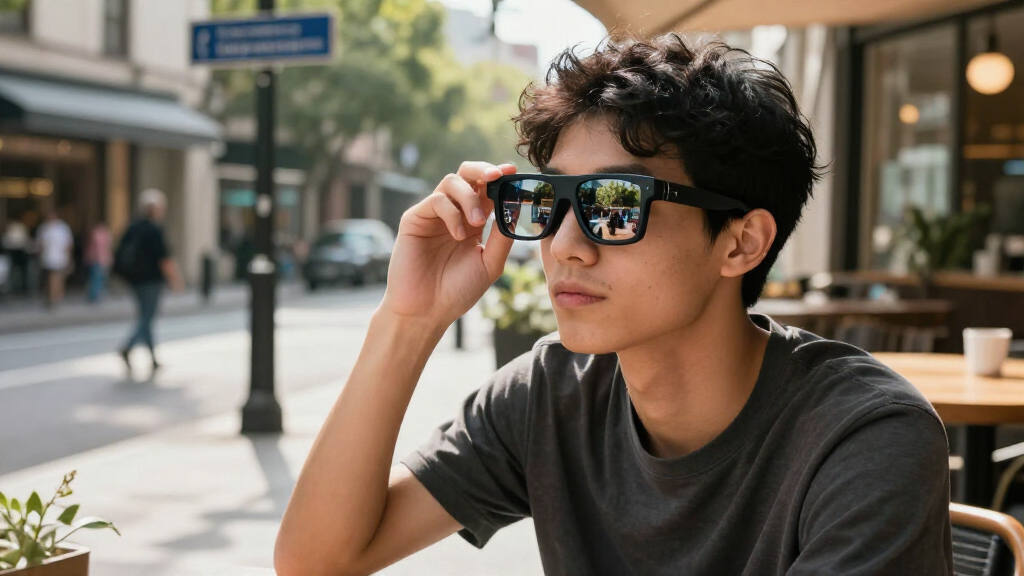
I ranked these augmented reality smart glasses by how well their stated features serve distinct buyer needs, rather than treating every large virtual-screen claim as equivalent. My main criteria were display resolution and refresh-rate claims, spatial tracking, the usefulness of AI features, compatibility with phones and other source devices, wearing comfort, and how much extra hardware a setup may require. For screen-first glasses, I gave more weight to a usable virtual display and tracking; for translation-focused models, I focused on whether their named tools match practical communication and prompting tasks.
The order favors versatility: the XREAL One Pro earns the top position for pairing native 3DoF with a high-refresh display, while the XREAL 1S remains a strong alternative for buyers who want spatial features. Dedicated video glasses follow, with the RayNeo and VITURE options judged by their stated display strengths and likely use. AI glasses and multi-screen systems rank by specialization and setup demands, not by a claim that they are inferior in every respect. Where listings use similar names or vary in accessory details, I treat the precise model and package contents as something buyers should verify before purchase.
Factors to Consider When Choosing Augmented Reality Smart Glasses
Before choosing among these glasses, I would settle the use case and device setup first. A virtual screen for a laptop or phone calls for different features than translation while speaking with someone face to face. These broader checks can prevent a mismatch that a long feature list will not reveal.
Decide Whether You Need a Virtual Screen or Everyday Information
Start by asking what you want to see through the glasses most often. Video-focused models are designed to present a large private screen, while translation and teleprompter models emphasize readable prompts or text in a more socially practical setting. A large display claim does not mean the glasses act like transparent, full-room augmented reality; many products primarily show content from a connected device. Buyers sometimes choose by the phrase “AR” without checking whether the experience is a floating screen or context-aware information. Match the core viewing experience to your daily task before comparing secondary features.
Check Tracking Needs Before Paying for Spatial Features
Spatial tracking can keep a virtual screen positioned relative to your surroundings, but it matters most when you move your head or want multiple virtual workspaces. For watching a film while seated, a simpler display may be enough, and extra tracking may not improve the experience you care about. Confirm whether a listing specifies native 3DoF or depends on a separate accessory, since those setups differ in portability and convenience. Do not assume every use of “spatial” describes the same tracking behavior. If you plan to use glasses for work, check whether the apps and connected devices support the spatial workflow you expect.
Verify Compatibility Across Your Actual Devices
Compatibility can matter more than display specifications if the glasses cannot connect to your phone, computer, or handheld console in the way you intend. Check the exact connection method and device requirements for your model, including whether an adapter, dock, or separate computing accessory is needed. A product name alone may not reveal whether your particular device supports video output or the required software. Buyers often overlook this until after choosing glasses based on screen size. Make a short list of the devices you will use and confirm support for each one before deciding.
Treat Resolution, Refresh Rate, and Screen Size as Separate Claims
Resolution affects image detail, refresh rate affects motion smoothness, and virtual screen size describes apparent scale; none of these figures replaces the others. A 120Hz claim may appeal to fast-moving games, while a sharp image matters more for text and extended viewing. A large virtual-screen measurement can sound compelling but does not tell you how comfortable or clear the image will be at your preferred fit. Compare specifications only when they refer to the same product version and measurement method. For productivity, prioritize legible text and a stable image over the biggest advertised screen.
Account for Fit, Focus, and Long-Session Comfort
Glasses that look portable on a product page still have to fit your face and remain comfortable during the time you plan to wear them. Frame shape, weight distribution, nose support, and the ability to adjust focus can affect whether the display stays clear without pressure. Prescription needs also deserve attention: check whether the model supports prescription inserts or another suitable correction method. Buyers commonly focus on display features and leave fit until after purchase, even though poor fit can make those features hard to use. For long films or work sessions, comfort and a stable image should weigh as heavily as headline specs.
Compare the Full Setup, Not Just the Glasses
Some experiences may rely on a compatible phone or computer, while others may call for an extra spatial computer or accessory. That additional hardware can expand what the glasses do, but it also adds bulk, setup steps, and another compatibility check. Read package contents carefully, especially for similarly named listings or products whose titles mention a station or computer. A lower-complexity setup can be the better choice if you mainly want video from a device you already own. Pay more for added hardware only when its specific functions solve a need you have.
Frequently Asked Questions
Are these glasses full augmented reality, or are they mainly wearable screens?
Most of the entertainment-focused models in this roundup are best understood as wearable displays that show content from a connected device. Native 3DoF on the XREAL One Pro and XREAL 1S adds spatial positioning, but that is not the same as every app placing interactive objects throughout a room. The INMO GO3 and AI translation listing focus on text-based assistance rather than a large video screen. Check the product’s supported apps and tracking behavior if you need more than private viewing. The label “AR” alone does not describe the experience precisely.
Will any of these glasses work with my phone or laptop?
Compatibility depends on the exact device, connection support, and any required software or accessories. Before choosing, confirm that your phone or computer can send the type of video output the glasses need and check the maker’s supported-device information for your precise model. A USB-C connector by itself does not guarantee that every phone supports display output. If a listing mentions a separate spatial computer or station, verify whether it is included and whether you need it for your planned use. Buying only after checking your own devices can prevent a costly mismatch.
Should I choose native 3DoF tracking if I mainly watch movies?
Not necessarily. Native 3DoF can help keep a virtual screen positioned as you move your head, which may suit spatial work or a more anchored viewing setup. For straightforward video watching, a stable display and comfortable fit may matter more than tracking. Compare the XREAL One Pro and XREAL 1S with simpler screen-focused options based on how you will actually watch content. If you do not expect to use spatial positioning, the added feature may not justify choosing a more complex setup.
Can translation or teleprompter glasses replace video-focused AR glasses?
They serve different needs, so I would not treat them as direct substitutes. Translation and teleprompter features can make sense for conversations, presentations, or reading prompts discreetly, while models such as the RayNeo Air and XREAL lines emphasize a private virtual display. Check what languages, app connections, and prompt controls the specific AI model supports before relying on it for work. If movies or gaming are your main goal, a screen-focused design is likely a closer match. If you need both, verify that the product can handle each task well rather than assuming one feature set covers the other.
How can I compare the RayNeo Air listings with similar product names?
Read the exact model name and specification list rather than relying on a shared “Air” label or similar virtual-screen claims. This roundup includes RayNeo Air 4 Pro listings with closely related descriptions as well as the distinct Air 3s, so confirm the model identifier, refresh-rate claim, display details, and package contents. Check whether a listing names HDR10 or HueView and whether those details apply to the specific version being sold. Accessories and regional versions can also change what is included. When two pages appear nearly identical, compare their official model information before choosing between them.
Conclusion
For the strongest mix of spatial capability and screen-focused entertainment, I recommend the XREAL One Pro as the best overall; its native 3DoF and 120Hz display claims suit buyers who will use more than basic video playback. The XREAL 1S is my best value-style alternative for shoppers who want native spatial tracking but should compare its exact package and display details before choosing. For a best premium pick, I would favor the One Pro when its tracking features matter to your routine. Beginners who mainly want a straightforward personal screen should start with a screen-focused option such as the RayNeo Air 3s, after confirming device compatibility. For specific needs, choose the INMO GO3 or AI translation listing for prompts and translation, and consider Rokid Max2 with Station2 or DOMARS for multi-screen spatial viewing only after checking the required hardware. The right choice depends less on the biggest screen claim than on whether the glasses match your devices, fit, and main task.
Halloween Picks

Panefright Halloween Window Projector – Scary Projector for Spooky Decor

Kalolary 12ft Halloween Witch Haunted House Inflatable Archway

Vexalify 11-Inch Halloween Pumpkin Fog Machine with 12-Color Lights
As an affiliate, we earn on qualifying purchases.