
Start by reviewing your app permissions and restrict access to your camera, microphone, and location if unnecessary. Turn on battery saver mode and reduce display brightness to extend your battery life. Disable background activity for apps you don’t use often and turn off non-essential notifications to save power and reduce distractions. Keeping your software updated also boosts security and performance. If you want to uncover more hidden settings that could make a big difference, keep exploring these options.
Key Takeaways
- Disable unnecessary background app refresh to reduce battery drain and improve performance.
- Limit app permissions for location, microphone, and camera to enhance privacy and security.
- Turn on battery saver mode proactively to extend battery life during low charge.
- Customize notification settings to prevent distractions and save power.
- Regularly update device software to access security patches and new privacy features.
Your smartphone is a powerful tool, but many of its default settings may not be optimized for your privacy, security, or convenience. One of the most impactful adjustments you can make involves battery optimization. By reviewing your device’s battery settings, you can identify which apps consume the most power and restrict their background activity. This small tweak can significantly extend your phone’s battery life, reducing the need for frequent recharges. Most smartphones have a built-in battery saver mode—activate it when your charge drops below a certain level, and it’ll limit background processes, animations, and other power-hungry features. Additionally, turning off unnecessary location services or notifications for apps you don’t use often can further conserve energy. These simple steps help your phone last longer throughout the day, making it more reliable when you need it most. Incorporating smartphone customization can also help you tailor your device’s settings to better suit your daily routine. For example, adjusting your display brightness and timeout settings can further conserve battery life.
Optimize your battery by reviewing app usage, enabling power-saving modes, and turning off unused location services and notifications.
Beyond battery life, privacy controls are often overlooked but crucial for protecting your personal information. Start by reviewing app permissions—many apps ask for access to your camera, microphone, contacts, or location, even when it’s not necessary for their main function. Limiting access ensures that your data isn’t shared or accessed without your consent. Also, explore your device’s privacy settings to control what information is visible to others, such as your profile details or activity status. Disabling location tracking for apps that don’t require it can prevent unnecessary data collection, reducing your digital footprint. Many smartphones also allow you to manage ad preferences, limiting targeted advertising based on your browsing habits. Implementing these privacy controls gives you more control over your data, helping you avoid unwanted tracking and potential security risks. Paying attention to default settings can further enhance your privacy and security, as they often contain options that are not immediately obvious.
Another overlooked setting is your notifications and app management. By customizing notification preferences, you prevent unnecessary alerts that drain your battery and distract you throughout the day. Turning off non-essential notifications not only conserves power but also helps you maintain focus. Additionally, uninstalling or disabling apps you no longer use clears up storage and reduces background activity, further boosting your device’s performance and privacy. Keeping your software updated is equally important; updates often include security patches that protect you from vulnerabilities. Regularly reviewing and adjusting these settings ensures your device operates efficiently, securely, and in line with your personal preferences. Furthermore, enabling software updates promptly can also ensure you benefit from the latest privacy features and security enhancements.
In essence, taking a few minutes to optimize your battery, privacy controls, and notifications can dramatically improve your smartphone experience. These small but impactful changes make your device more secure, longer-lasting, and better suited to your daily needs. Don’t overlook these tweaks—your phone’s performance, security, and your peace of mind depend on them.

Sharmeal Jump Starter 6000A, 12V Car Battery Jump Starter with USB Quick Charge (Up to All Gas or 10.0L Diesel Engine), Battery Booster with 3 Modes Flashlight and Jumper Cable
【Start Dead Batteries】The Sharmeal car battery jump starter power pack with 6000A peak, safely start the 12V vehicles…
As an affiliate, we earn on qualifying purchases.
As an affiliate, we earn on qualifying purchases.
Frequently Asked Questions
How Often Should I Review My Smartphone’s Security Settings?
You should review your smartphone’s security settings at least once a month. Regular checks help you manage app permissions and control location tracking, ensuring your data stays private. Update your security options whenever new features or updates are released, and stay vigilant about permissions you grant apps. Frequent review keeps your device protected, prevents unauthorized access, and helps you maintain control over your personal information.
Can Changing Display Settings Improve Battery Life Significantly?
They say, “A picture is worth a thousand words,” but your display settings can conserve your battery instead. By adjusting display calibration for ideal brightness and contrast, you reduce unnecessary power drain. Setting a shorter screen timeout ensures your display isn’t wasting energy when you’re not using your device. These small tweaks can considerably extend your battery life, making your smartphone more efficient and ready when you need it most.
Are There Privacy Settings I Should Enable for Better Security?
Yes, you should enable privacy settings for better security. Review app permissions and restrict access to sensitive data like camera, microphone, and contacts. Turn off location tracking for apps that don’t need it, or set it to only active when using the app. These steps help prevent unauthorized data access, protect your privacy, and reduce potential security risks. Regularly updating these settings keeps your device safer.
How Do I Optimize Notifications to Reduce Distractions?
To optimize notifications and reduce distractions, start with notification management by customizing alerts for essential apps and silencing non-urgent ones. Enable Do Not Disturb during focused periods to block unnecessary interruptions. You can set schedules for Do Not Disturb, ensuring you only get notifications when needed. This way, you stay productive without missing critical updates, and your smartphone becomes a tool that works for you instead of against you.
What Settings Help Improve My Phone’s Overall Performance?
You can improve your phone’s performance by optimizing app customization and accessibility features. Turn off background app refresh for apps you don’t need constantly updating. Use accessibility settings to disable animations and reduce motion, which can make your device feel snappier. Clearing cache and managing storage also help. These tweaks reduce strain on your phone’s processor, making it run smoother and faster, enhancing your overall user experience.

Permission manager
1. List dangerous permissions data which app requested.
As an affiliate, we earn on qualifying purchases.
As an affiliate, we earn on qualifying purchases.
Conclusion
By tweaking these often-overlooked settings, you’re taking control of your smartphone rather than letting it control you. Small changes can make a big difference in your daily life, boosting privacy, saving battery, and improving performance. Don’t wait for things to go awry—get ahead of the curve now. Remember, it’s better to be safe than sorry, so take these simple steps today and enjoy a smoother, more secure digital experience.
![IMBZBK [Auto-Dust Removal] 3 Pack Privacy Screen Protector for iPhone 13 Anti Spy Private Accessories, Case Friendly Film, Military Grade Tempered Glass 3 Camera Lens Protector](https://m.media-amazon.com/images/I/51ZrDxIx-FL._SL500_.jpg)
IMBZBK [Auto-Dust Removal] 3 Pack Privacy Screen Protector for iPhone 13 Anti Spy Private Accessories, Case Friendly Film, Military Grade Tempered Glass 3 Camera Lens Protector
[Auto-Dusting Removal Installation] Includes everything you need with innovative automatic positioning, dust removal, and absorption technology, making the…
As an affiliate, we earn on qualifying purchases.
As an affiliate, we earn on qualifying purchases.
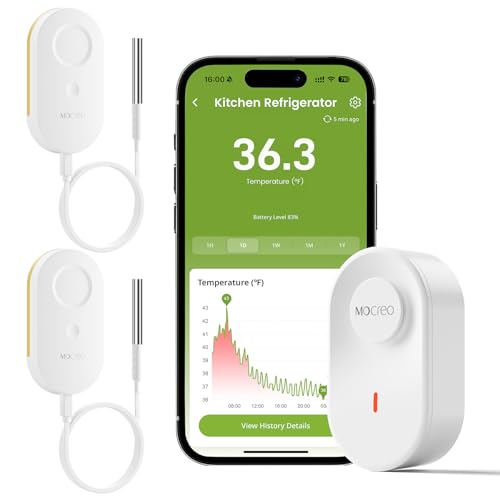
MOCREO WiFi Thermometer Freezer Alarm, Email Alert, App Notification, Data Record Export, No Subscription Fee, 2 Remote Wireless Temperature Sensors for Refrigerator, Freezer, Hot Tub
Update Remote Mute: Enjoy the convenience of dismissing the hub's beep directly from the Smart App, eliminating the…
As an affiliate, we earn on qualifying purchases.
As an affiliate, we earn on qualifying purchases.