
A stylus makes your phone more useful by delivering precise control for tasks like note-taking, drawing, and maneuvering with ease. It helps improve handwriting clarity and reduces accidental taps, making your work neater and more professional-looking. With pressure sensitivity, it lets you create detailed art and highlights effortlessly. Whether you’re creating or editing, a stylus boosts accuracy and makes your phone experience smoother and more enjoyable. Keep exploring to discover even more benefits.

Get the latest gadgets delivered free — and shop member deals
- Fast, free delivery on millions of items
- Access to Prime Big Deal Days deals on October 6–7
- Prime Video, Amazon Music and more included
Key Takeaways
- Provides precise control for tapping, scrolling, and selecting small screen elements.
- Enhances handwriting and note-taking for clearer, more professional digital notes.
- Supports creative tasks with pressure sensitivity and accurate strokes.
- Improves navigation and reduces accidental taps on compact screens.
- Boosts productivity through efficient annotations, highlighting, and detailed editing.

Have you ever wondered what makes a stylus truly useful even on a phone? It’s not just about having a fancy pen; it’s about how effectively it enhances your experience. When you use a stylus, the main advantages revolve around improving handwriting clarity and screen precision. These features are what set a good stylus apart from just any pen you might keep nearby. With the right stylus, your notes, sketches, or annotations become sharper, clearer, and more accurate, even on a small screen.
A good stylus enhances handwriting, precision, and clarity, transforming your phone experience with sharper notes and smoother navigation.
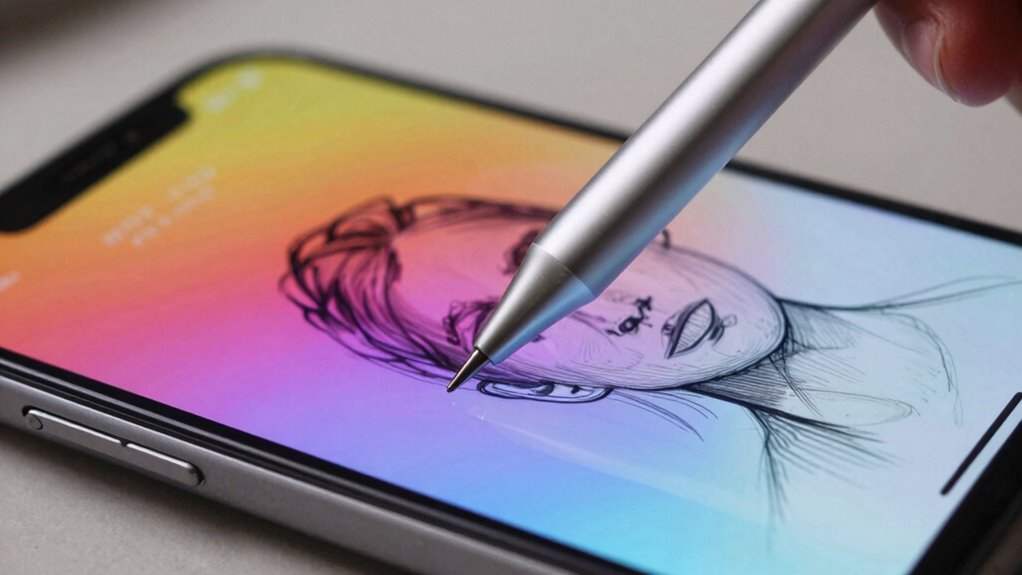
You’ll notice that a quality stylus helps you write more neatly. Unlike using your finger, which can be bulky and imprecise, a stylus offers a finer point that mimics the control of a pen or pencil. This means your handwriting becomes more legible, especially when jotting down quick notes or filling out forms. The precision allows you to avoid accidental taps and smudges, making your interactions smoother and more efficient. Whether you’re highlighting text or drawing detailed icons, a stylus ensures your work is crisp and professional-looking.
Screen precision is crucial when navigating your device, and a good stylus makes a significant difference here. Instead of tapping multiple times to get the cursor where you want it, a stylus allows you to target specific areas with pinpoint accuracy. This is particularly helpful on smaller screens where precision can be challenging. When you select a stylus designed for your device, it often offers palm rejection technology, enabling you to rest your hand on the screen without triggering unwanted inputs. This creates a more natural writing or drawing experience, similar to using paper and pen. Additionally, a stylus can help you better utilize digital drawing tools, which are increasingly popular for creative projects. A high-quality stylus also often supports pressure sensitivity, giving you greater control over your artwork or notes.
A well-designed stylus also offers better control over pressure sensitivity, which can vary depending on your activity. For example, applying more pressure might produce darker lines or thicker strokes in drawing apps, giving your work a more dynamic, natural feel. This level of control isn’t easily achieved with your finger. As a result, your digital handwriting and artwork look more refined and professional. Additionally, color accuracy and sensitivity are important factors that can be enhanced by a good stylus, especially for creative work. Moreover, compatibility of a stylus with your device ensures you get the most seamless and responsive experience possible.
Ultimately, a stylus becomes useful on a phone because it transforms how you interact with your device. It enhances your ability to write clearly, draw accurately, and navigate with precision. When you choose a stylus that’s compatible with your phone and suits your needs, you unlock a new level of productivity and creativity. It’s not just about having a pen; it’s about making your digital experience smoother, clearer, and more satisfying.
Using a stylus also allows you to take advantage of specialized features that improve your overall experience, making digital tasks more intuitive and enjoyable.
precision stylus for smartphones
As an affiliate, we earn on qualifying purchases.
As an affiliate, we earn on qualifying purchases.
Frequently Asked Questions
Can a Stylus Improve Handwriting Accuracy on a Phone?
Yes, a stylus can improve your handwriting accuracy on a phone. It provides better control and precision, leading to clearer, more legible notes. Using a stylus enhances your handwriting precision, making it easier to jot down ideas quickly. This ultimately boosts your note-taking efficiency, especially when compared to using your finger. With a stylus, you’ll find it easier to write neatly and organize your thoughts on your phone’s screen.
Are There Styluses Compatible With All Phone Models?
Not all styluses are compatible with every phone model, but many offer universal compatibility thanks to standard stylus standards like Bluetooth or capacitive tips. When choosing a stylus, look for those that specify broad compatibility with various devices. You’ll find that styluses adhering to these standards work seamlessly across different brands and models, making them a versatile choice for your phone, regardless of the device’s make or operating system.
How Does a Stylus Affect Battery Life?
Using a stylus can slightly increase your phone’s battery drain because it requires additional power for features like pressure sensitivity or Bluetooth connectivity. This impacts power consumption, especially if the stylus uses wireless features or active components. To minimize this, opt for passive styluses or limit features that drain more battery. While the effect is usually small, consistent use may lead to noticeable changes in your device’s overall battery life.
Is a Stylus Necessary for Drawing on a Phone?
You don’t need a stylus to draw on your phone, but it sure feels like a secret weapon for digital precision and creative versatility. Without it, your sketches might resemble a toddler’s doodles, but with one, every line becomes sharp and controlled. It’s ironic—an accessory that’s not essential, yet transforms your screen into a canvas of detailed artistry. So, while not necessary, a stylus makes your creative process smoother and more accurate.
Can a Stylus Help With Accessibility Features?
Yes, a stylus can enhance accessibility features on your phone. It allows you to use voice commands more easily by precisely selecting options and steering menus. Plus, a stylus can help if your screen sensitivity isn’t perfect or if you have difficulty tapping small icons. By providing better control and accuracy, it makes interacting with your device more comfortable and inclusive, especially for those with limited dexterity.
pressure sensitive stylus for drawing
As an affiliate, we earn on qualifying purchases.
As an affiliate, we earn on qualifying purchases.
Conclusion
A stylus can truly enhance your phone experience, offering precision and comfort that fingers can’t always provide. Whether you’re drawing, taking notes, or steering small icons, a stylus makes these tasks easier and more accurate. Did you know that 67% of digital artists prefer styluses for their work? That statistic shows just how valuable a stylus can be, even on a phone, turning everyday use into a more productive and enjoyable experience.
stylus with palm rejection for phones
As an affiliate, we earn on qualifying purchases.
As an affiliate, we earn on qualifying purchases.
As an affiliate, we earn on qualifying purchases.
Evergreen bestsellers Picks
bestsellers
As an affiliate, we earn on qualifying purchases.