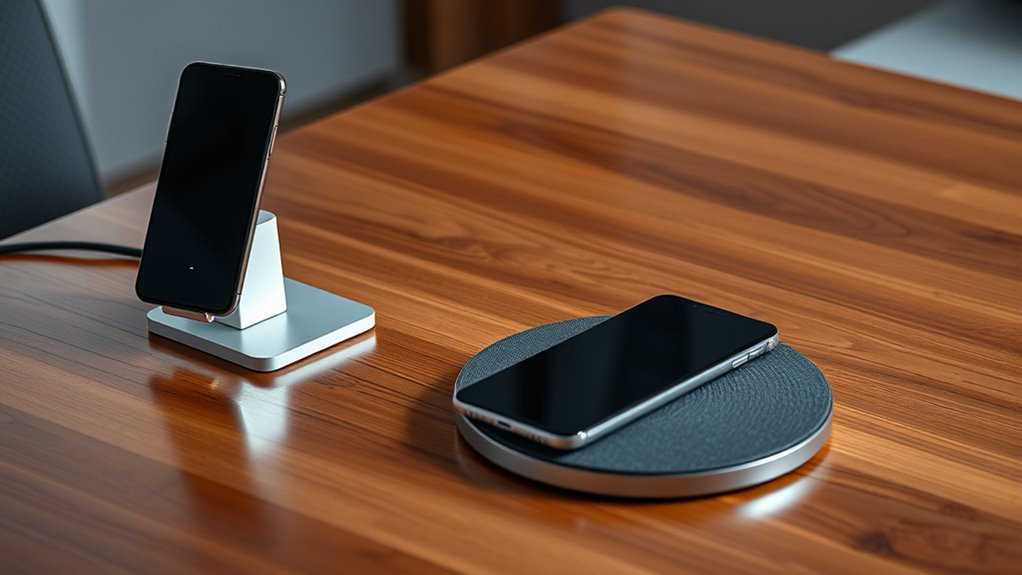
Choosing between a wireless charging stand and pad depends on your routine. If you want an upright position for notifications and easy device access, a stand is ideal. For versatile, flat-laying charging suited for multiple devices or different layouts, a pad works best. Consider your space, device compatibility, and safety features. To find out which option fits your lifestyle and how to get the most from each, keep exploring the details below.
Open a free Amazon Business account
Business pricing, bulk buying and tax-exempt orders.
As an affiliate, we earn on qualifying purchases.
Key Takeaways
- Stands offer better viewing angles and quick access for notifications, ideal for workspace use.
- Pads provide versatile placement and support multiple devices or different sizes easily.
- Compatibility and safety features like temperature control are crucial regardless of choice.
- Stands are suited for users prioritizing convenience and device visibility; pads suit flexible, multi-device charging.
- Consider your daily habits and device compatibility to determine whether a stand or pad best fits your needs.
Wireless charging has become a popular way to power up your devices without the hassle of cords, but choosing between a wireless charging stand and a pad can be confusing. Both options offer convenience, yet they serve different needs and preferences. When selecting the right charger, you need to consider factors like battery safety and device compatibility. Ensuring your device is compatible with the charger prevents issues like overheating or incomplete charging, which could compromise your device’s battery health over time. Compatibility depends on the charging standard used—most modern smartphones support Qi wireless charging, but it’s best to double-check your device specifications before making a purchase.
A wireless charging stand typically offers a more upright position for your device, making it easier to see notifications or use your phone while it charges. This design is ideal if you want quick access to your device without picking it up. However, because stands often have a smaller charging surface, you need to position your phone precisely to ensure proper contact. Misalignment can lead to inefficient charging or interruptions, which might raise concerns about battery safety if your device isn’t charging correctly or overheating. If you choose a stand, look for models with adjustable angles and a stable base to reduce the risk of accidental falls or misalignment.
Wireless charging pads, on the other hand, provide a flat surface where you place your device flat down. They’re generally more versatile, accommodating different device sizes and positions. A pad can be more convenient if you want to charge multiple devices or prefer to lay your phone down while charging. Since pads typically have a larger surface area, they’re less sensitive to precise placement, reducing the risk of misalignment-related issues. This can be better for maintaining battery safety, as consistent, proper contact helps prevent overheating and prolongs your device’s battery life. Plus, many pads are designed with built-in safety features like temperature control and foreign object detection, which further safeguards your device. Additionally, choosing a charger made with European standards can enhance overall safety and compatibility.
Ultimately, whether you choose a stand or a pad depends on your daily routine and preferences. If you value quick access and a tidy workspace, a stand might suit you better. But if you want flexible placement and simplicity, a pad could be the way to go. Regardless of your choice, always ensure that the charger is compatible with your device and adheres to safety standards. Properly matching your device with a compatible charger and paying attention to safety features will help you enjoy wireless charging without risking battery damage or safety hazards.

Leeboom Laptop Stand for Desk, Adjustable Foldable Aluminum Riser, Silver
- Adjustable Height: 7 ergonomic height settings
- Wide Compatibility: Fits laptops 10-15.6 inches
- Multi-Device Fit: Compatible with phones, tablets, books
As an affiliate, we earn on qualifying purchases.
Frequently Asked Questions
Can Wireless Chargers Damage My Phone’s Battery Health?
Wireless chargers generally won’t damage your phone’s battery health if used properly. They may cause slight battery degradation over time due to heat or increased charging cycles, but modern phones have built-in protections to prevent overheating and overcharging. To minimize risks, avoid using wireless chargers for extended periods or in hot environments. Using quality chargers and following manufacturer guidelines helps preserve your battery’s lifespan and reduces potential damage.
Are Wireless Charging Stands Compatible With All Phone Models?
Wireless charging stands aren’t compatible with all phone models due to compatibility issues and device limitations. Before buying, you should check if your phone supports Qi wireless charging, as most newer smartphones do, but some older or specialized devices might not. Always verify the stand’s specifications and your phone’s capabilities to avoid frustration. If your device isn’t compatible, a wireless pad or a different charging method might be a better choice.
How Do I Secure My Phone on a Wireless Pad?
Your phone’s safety depends on proper placement, so secure it by aligning with the magnetic alignment feature if available. Gently place your phone on the wireless pad at the ideal charging angle, ensuring it clicks into place. Keep your device centered for consistent charging. This simple step transforms your pad into a fortress of power, preventing slips and ensuring your phone charges efficiently without ever falling off again.
Do Wireless Stands Support Fast Charging?
Yes, wireless stands often support fast charging, but you should check for fast charging compatibility before buying. Many stands are designed to deliver higher wireless charging speeds, reducing your phone’s charging time. Look for models that specify fast charging support, usually through compatible power adapters and Qi technology. This way, you get quicker, more efficient wireless charging, making your device ready to use sooner without sacrificing convenience.
Is Wireless Charging Safe to Use Overnight?
Yes, wireless charging overnight is generally safe, but you should be cautious. Your device’s battery might overheat if left on the charger for too long, which can damage it over time. Also, electromagnetic exposure from wireless chargers is minimal, but if you notice your device gets unusually hot, unplug it. Using a quality charger with temperature controls helps prevent battery overheating and keeps you safe during overnight charging.
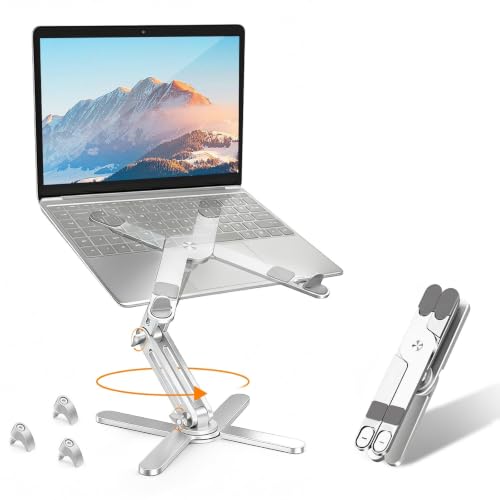
MOALLIA N86 360 Rotating Laptop Stand for Desk with Locking Knobs, Silver
- 360° Rotatable Axis: Allows easy screen sharing and angle adjustment
- Ergonomic Height Adjustment: Elevates laptop to eye level to improve posture
- Tool-Free Adjustment: Adjust height and angles by hand easily
As an affiliate, we earn on qualifying purchases.
Conclusion
So, whether you choose a stand or a pad, you’re really just betting on convenience over complexity—like picking between a simple handshake and a complicated dance. Ironically, both promise effortless charging, yet one demands a bit more space and attention. In the end, it’s amusing how both options aim to simplify your life, but only you can decide which one makes you feel smarter—while secretly hoping it’s the easier one.

Nulaxy Ergonomic Adjustable Laptop Stand for Desk, Dual Foldable Computer Riser with Advanced Heat-Vent, Heavy-Duty Portable Notebook Holder for Posture Correction, Compatible with Mac 10-17" Laptops
- Ergonomic Posture Support: Elevates laptop to reduce neck strain
- Stable Dual-Rod Design: Ensures wobble-free support up to 22 lbs
- Enhanced Cooling Panel: Provides superior airflow for thermal management
As an affiliate, we earn on qualifying purchases.
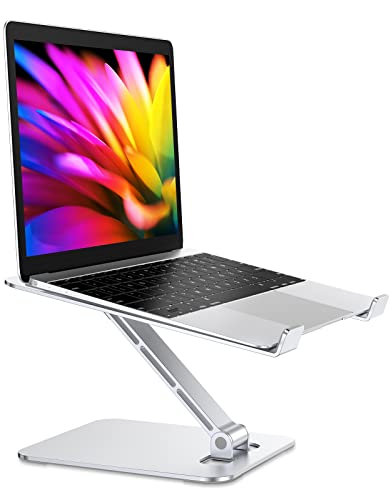
RIWUCT Foldable Aluminum Alloy Laptop Stand for Desk, Height Adjustable Ergonomic Computer Stand for Laptop, Portable Laptop Riser Holder Printer Stand Compatible with MacBook Pro Air/HP/Dell 10-16"
- Adjustable Height and Angle: Raises up to 7.48 inches with multiple angles
- Foldable and Portable Design: Easy to store and carry
- Sturdy Aluminum Construction: Supports up to 8.8 lbs without shaking
As an affiliate, we earn on qualifying purchases.
Flea & tick season Picks
flea and tick prevention
As an affiliate, we earn on qualifying purchases.