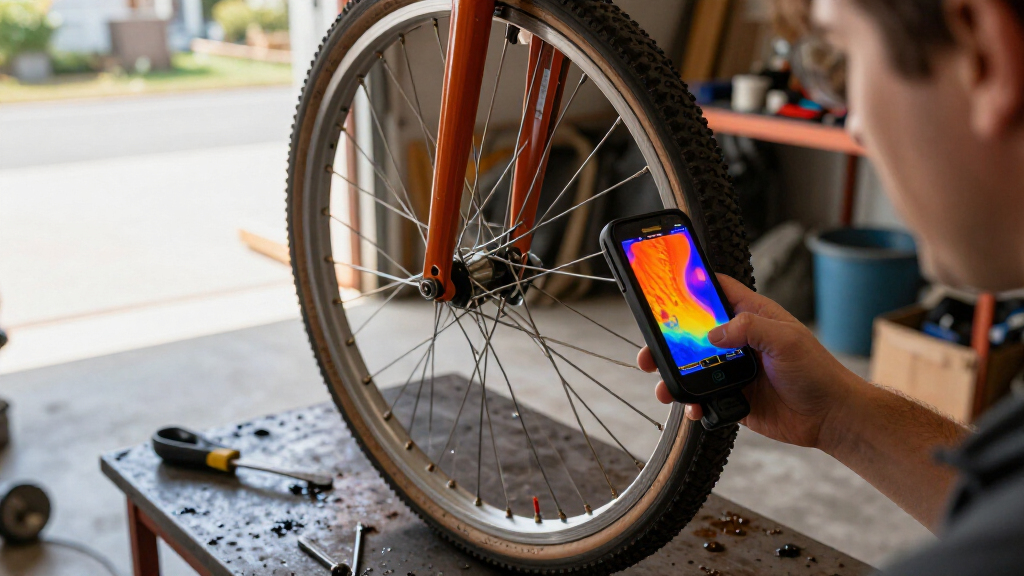

Smartphone thermal cameras turn a compatible phone into a portable tool for spotting heat patterns in buildings, vehicles, and equipment. My best overall pick is the TOPDON TC001 Max Dual-Lens, which stands out for buyers who want a more versatile imaging setup; the Thermal Master P3 512×384 X³IR is a standout for higher-resolution detail, while the TOPDON TC002C Duo offers another option for USB-C users. The main tradeoffs are image detail, phone compatibility, close-up capability, and how much you want to rely on a separate camera accessory. Read on for the full comparison, buying advice, and recommendations by use case.

Get the latest gadgets delivered free with Prime
- Fast, free delivery on millions of items
- Prime Video, Amazon Music and more included
- Member-only deals all year
Complete the kit



Key Takeaways
- The TC001 Max leads on versatility: its dual-lens design gives it a distinct role compared with simpler plug-in cameras, though buyers should check that its connection and app work with their phone.
- The Thermal Master P3 512×384 favors detail: its stated resolution makes it a compelling choice when clearer thermal patterns matter more than choosing the smallest, simplest accessory.
- Close-up work calls for a different feature set: models sold with macro lenses, including the Thermal Master P3 with Manual Macro Lens and VEVOR, target small components rather than general room scans.
- Resolution labels need careful reading: several listings distinguish sensor resolution from enhanced or “Super IR” output, so those numbers should not be treated as interchangeable measures of native sensor detail.
- USB-C fit is a deciding factor across the lineup: phone port, operating-system support, connector clearance, and app compatibility can matter more than a camera’s headline specification.
| TOPDON TC001 Max Dual-Lens Thermal Camera |  | Best Overall | Thermal resolution: 256 × 192 | Enhanced resolution: 512 × 384 with TISR | Refresh rate: 25 Hz | VIEW LATEST PRICE | See Our Full Breakdown |
| TOPDON TC001 Mini Thermal Imaging Camera for iPhone, Android, iPad, and Windows |  | Best for Beginners | IR sensor resolution: 96 × 96 | Enhanced image resolution: 384 × 384 | Thermal sensitivity: ≤40 mK | VIEW LATEST PRICE | See Our Full Breakdown |
| Thermal Master P3 Smartphone Thermal Camera, 512×384 X³IR |  | Best for Close-Up Work | Native thermal resolution: 256 × 192 | Upscaled resolution: 512 × 384 | Refresh rate: 25 Hz | VIEW LATEST PRICE | See Our Full Breakdown |
| AMPBANK M192 USB-C Thermal Camera |  | Best Accessory Bundle | Thermal resolution: 192 × 192 | Enhanced resolution: Up to 384 × 384 | Refresh rate: 25 Hz | VIEW LATEST PRICE | See Our Full Breakdown |
| TOPDON TC002C Duo USB-C Thermal Imaging Camera | 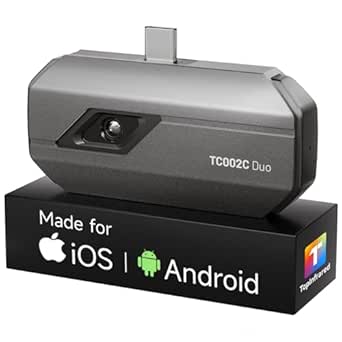 | Best for Everyday USB-C Inspections | Thermal resolution: 256 × 192 | Enhanced resolution: 512 × 384 with TISR | Refresh rate: 25 Hz | VIEW LATEST PRICE | See Our Full Breakdown |
| Thermal Imaging Camera for USB-C Smartphones, 192 × 192 Resolution |  | Best for Simple Home Inspections | Connector: USB-C | Compatibility: iPhone 15/16/17 series and compatible Android devices | Infrared resolution: 192 × 192 | VIEW LATEST PRICE | See Our Full Breakdown |
| TOPDON TC001 Thermal Imaging Camera for Android |  | Best for Android Measurement Tools | Thermal resolution: 256 × 192; enhanced to 512 × 384 with TISR | Temperature range: -4°F to 1022°F (-20°C to 550°C) | Temperature accuracy: ±3.6°F (±2°C) or ±2% | VIEW LATEST PRICE | See Our Full Breakdown |
| Thermal Master P1 USB-C Thermal Camera, 160×120 IR Resolution |  | Best for Cross-Device Flexibility | IR resolution: 160 × 120 | Enhanced resolution: 320 × 240 | Thermal sensitivity: 0.04°C NETD | VIEW LATEST PRICE | See Our Full Breakdown |
| Thermal Master P3 Thermal Camera for iPhone and Android with Manual Macro Lens |  | Best for Close-Up Diagnostics | Thermal resolution: 256 × 192 native; 512 × 384 enhanced | Thermal sensitivity: ≤35 mK | Field of view: 40° × 30° | VIEW LATEST PRICE | See Our Full Breakdown |
| REVASRI Thermal Camera for iPhone and Android, 320×240 Super IR Resolution | 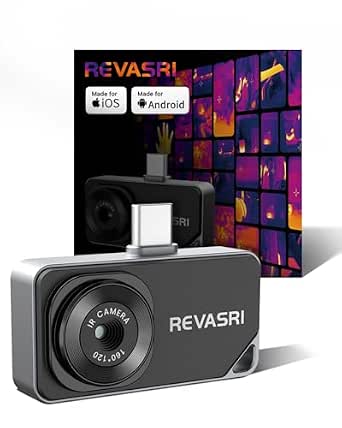 | Best for On-Device Alerts and Tracking | Image resolution: 320 × 240 Super IR | Refresh rate: 25 Hz | Thermal sensitivity: 40 mK | VIEW LATEST PRICE | See Our Full Breakdown |
| Thermal Master P1 Thermal Camera for USB-C iOS/Android, 320×240 Resolution |  | Best for Long Inspection Sessions | IR resolution: 320 × 240 | Refresh rate: 25 Hz | Temperature range: -4°F to 1112°F (-20°C to 600°C) | VIEW LATEST PRICE | See Our Full Breakdown |
| VEVOR USB-C Thermal Imaging Camera with Macro Lens |  | Best for Circuit-Board Close-Ups | IR resolution: 256 × 192, enhanced to 512 × 384 | Refresh rate: 25 Hz | Thermal sensitivity: ≤40 mK | VIEW LATEST PRICE | See Our Full Breakdown |
| VANTRUE POWER TS2 Thermal Camera for USB-C iPhone and Android |  | Best for Focus and Measurement Control | Resolution: 512 × 384 enhanced from 256 × 192 raw data | Refresh rate: 25 Hz | Thermal sensitivity: 0.035°C | VIEW LATEST PRICE | See Our Full Breakdown |
| GOYOJO GW192A Smartphone Thermal Imaging Camera, 192×192 Resolution, USB-C |  | Best Compact Wide-View Pick | Model: GW192A | Infrared resolution: 192 × 192 | Pixel pitch: 12 μm | VIEW LATEST PRICE | See Our Full Breakdown |
| smartphone thermal camera | Temperature range | Refresh rate | Compatibility | Thermal sensitivity |
|---|---|---|---|---|
| TOPDON TC001 Max Dual-Lens The | -20°C to 550°C (-4°F to 1,022°F) | 25 Hz | Android, iPhone, iPad, and Windows | ≤40 mK |
| TOPDON TC001 Mini Thermal Imag | -20°C to 550°C (-4°F to 1,022°F) | 25 Hz | iOS, Android, and Windows | ≤40 mK |
| Thermal Master P3 Smartphone T | -20°C to 600°C (-4°F to 1,112°F) | 25 Hz | Android, USB-C iPhones, older Lightning iPhones with adapter, and Windows with supplied extension cable | 35 mK |
| AMPBANK M192 USB-C Thermal Cam | -20°C to 450°C (-4°F to 842°F) | 25 Hz | USB-C devices running iOS, Android, or Windows; not compatible with Mac | 40 mK |
| TOPDON TC002C Duo USB-C Therma | -4°F to 1,022°F | 25 Hz | USB-C devices running iOS, Android, or Windows; temporarily not compatible with Mac or Android 16 | 40 mK |
| Thermal Imaging Camera for USB | -4°F to 752°F | — | iPhone 15/16/17 series and compatible Android devices | — |
| TOPDON TC001 Thermal Imaging C | -4°F to 1022°F (-20°C to 550°C) | 25 Hz | Android devices with OTG support; not compatible with iOS or iPhone 15 | — |
| Thermal Master P1 USB-C Therma | -4°F to 1112°F (-20°C to 600°C) | 25 Hz | — | 0.04°C NETD |
| Thermal Master P3 Thermal Came | -4°F to 1112°F (-20°C to 600°C) | — | — | ≤35 mK |
| REVASRI Thermal Camera for iPh | -4°F to 842°F (-20°C to 450°C) | 25 Hz | — | 40 mK |
| Thermal Master P1 Thermal Came | -4°F to 1112°F (-20°C to 600°C) | 25 Hz | USB-C smartphones and computers; Lightning iPhones require a separate adapter | — |
| VEVOR USB-C Thermal Imaging Ca | -4°F to 1022°F | 25 Hz | Android 8.0 or later; iOS 12.0 or later | ≤40 mK |
| VANTRUE POWER TS2 Thermal Came | -4°F to 1022°F (-20°C to 550°C) | 25 Hz | Android, USB-C iPhone, and Windows; Lightning iPhones require an adapter; Mac not currently supported | 0.035°C |
| GOYOJO GW192A Smartphone Therm | -4°F to 752°F (-20°C to 400°C) | — | iPhone 15, 16, and 17 series; compatible Android smartphones | — |
More Details on Our Top Picks
TOPDON TC001 Max Dual-Lens Thermal Camera
I rank the TC001 Max first for buyers who want a capable phone-powered camera without giving up visible context. Its dual-lens design pairs thermal readings with a visible-light image, making it easier to relate a hot spot to the component or surface around it. The 256 × 192 sensor, TISR-enhanced 512 × 384 output, and 25 Hz refresh rate offer a stronger imaging base than the TC001 Mini, whose native sensor is 96 × 96. It also covers temperatures up to 550°C and supports Android, Apple mobile devices, and Windows. The tradeoff is that it needs a compatible host device, and its stated accuracy is ±2°C or ±2%; buyers focused on close PCB work may prefer the Thermal Master P3 and its manual focus.
Pros:- Dual thermal and visible-light cameras help identify the physical source of a heat pattern.
- 256 × 192 native resolution with TISR-enhanced 512 × 384 output.
- 25 Hz refresh rate and temperature measurement from -20°C to 550°C.
- Compact 33 g design with USB-C and Lightning connection options.
Cons:- Requires a compatible phone, tablet, or Windows device to operate.
- Specified temperature accuracy is ±2°C or ±2%, which may not suit buyers needing tighter measurement tolerances.
Best for: Home inspectors and repair professionals who want thermal images with visible-light context and use compatible phones, tablets, or Windows devices.
Not ideal for: Buyers without a compatible phone or computer, or technicians who need manual focus for very close circuit-board inspection.
- Thermal resolution:256 × 192
- Enhanced resolution:512 × 384 with TISR
- Refresh rate:25 Hz
- Thermal sensitivity:≤40 mK
- Temperature range:-20°C to 550°C (-4°F to 1,022°F)
- Temperature accuracy:±2°C / ±2%
- Compatibility:Android, iPhone, iPad, and Windows
- Connectivity:USB-C; USB-C to Lightning adapter included
- Weight:33 g
Our verdict“Choose the TC001 Max for versatile, context-rich inspections across several device types; pick the Thermal Master P3 instead if close-up manual focusing is your priority.”
TOPDON TC001 Mini Thermal Imaging Camera for iPhone, Android, iPad, and Windows
The TC001 Mini suits newcomers who want inspection tools and guided analysis in a small, simple plug-in camera. It weighs 30 g, needs no separate battery, and runs on compatible iOS, Android, and Windows devices. Its app tools for hot and cold spots, alarms, inspection guidance, and reports give first-time users more help interpreting images than the more hands-on Thermal Master P3. The main compromise is image detail: the Mini starts with a 96 × 96 IR sensor and uses processing to produce a 384 × 384 image. That is a lower native resolution than the 256 × 192 sensors in the TC001 Max and P3, so fine details may be harder to distinguish. I’d choose it for basic home checks and learning, not detailed component diagnosis.
Pros:- Lightweight 30 g plug-in design requires no separate charging or wireless pairing.
- Works with compatible iOS, Android, and Windows devices.
- App includes hot- and cold-spot analysis, alarms, inspection guides, and report generation.
Cons:- The 96 × 96 native sensor has less detail than the 256 × 192 sensors in the TC001 Max and Thermal Master P3.
- The 384 × 384 image is enhanced through processing rather than captured at that native sensor resolution.
- Operation depends on having a compatible host device.
Best for: First-time thermal-camera buyers who want guided inspection tools for household checks and have a compatible iOS, Android, or Windows device.
Not ideal for: Electricians, HVAC technicians, or electronics repairers who need more native thermal detail for small components or fine patterns.
- IR sensor resolution:96 × 96
- Enhanced image resolution:384 × 384
- Thermal sensitivity:≤40 mK
- Refresh rate:25 Hz
- Temperature range:-20°C to 550°C (-4°F to 1,022°F)
- Temperature accuracy:±2%
- Compatibility:iOS, Android, and Windows
- Weight:30 g
Our verdict“Pick the TC001 Mini for guided basic inspections and easy app-based reporting, but choose the TC001 Max or P3 when native image detail matters more.”
Thermal Master P3 Smartphone Thermal Camera, 512×384 X³IR
For circuit boards and other small targets, the Thermal Master P3 stands apart through manual focus and an 8 mm minimum focusing distance. Those tools let buyers bring the camera close to a component, where a fixed-focus option such as the TOPDON TC002C Duo is less tailored to macro-style inspection. The P3 pairs a 256 × 192 native sensor with 512 × 384 upscaled output, 35 mK sensitivity, and a temperature ceiling of 600°C—higher than the TC002C Duo’s 550°C range. It remains pocket-sized and phone-powered, but compatibility takes more checking: Windows use needs the supplied extension cable, and older Lightning iPhones need the included adapter. Its stated accuracy is ±2°C, so it is best treated as a diagnostic tool rather than a precision reference instrument.
Pros:- Manual focus and an 8 mm minimum focusing distance support close inspection of small components.
- 256 × 192 native resolution with 512 × 384 upscaled output and 35 mK sensitivity.
- Measures temperatures up to 600°C, above the TC001 Max and TC002C Duo limits.
- Pocket-sized, phone-powered design with 25 Hz refresh and 15× digital zoom.
Cons:- Windows connectivity requires the supplied extension cable.
- Older Lightning iPhones need the included adapter.
- Upscaled output is not the same as native 512 × 384 thermal resolution.
Best for: Electronics repairers and field technicians who inspect PCBs, electrical components, or other small targets at close range.
Not ideal for: Buyers who want the simplest plug-in setup across devices, or who need a camera with no cable or adapter considerations for Windows and older iPhones.
- Native thermal resolution:256 × 192
- Upscaled resolution:512 × 384
- Refresh rate:25 Hz
- Thermal sensitivity:35 mK
- Temperature range:-20°C to 600°C (-4°F to 1,112°F)
- Temperature accuracy:±2°C (±3.6°F)
- Minimum focusing distance:8 mm
- Compatibility:Android, USB-C iPhones, older Lightning iPhones with adapter, and Windows with supplied extension cable
- Weight:0.93 oz
Our verdict“Choose the P3 for close, focused diagnostics on small parts; the TC001 Max is a better fit if visible-light context and broader plug-in convenience matter more.”
AMPBANK M192 USB-C Thermal Camera
The AMPBANK M192 is a practical choice for buyers who want useful inspection extras in the box, including an extension cable, carrying case, and PC analysis software. That bundle makes it more ready for mixed phone-and-computer workflows than the TOPDON TC002C Duo, which is also compact but is presented more as a straightforward mobile camera. The M192 uses a 192 × 192 sensor with enhanced output up to 384 × 384 and refreshes at 25 Hz; its 450°C upper limit is lower than the TOPDON models’ 550°C and the P3’s 600°C. It also supports adjustable high and low alarms, which can help flag temperature thresholds during routine HVAC or electrical checks. Its key restriction is platform support: it requires USB-C and is not compatible with Mac.
Pros:- Includes an extension cable, EVA carrying case, cleaning cloth, and PC analysis software.
- Adjustable high and low temperature alarms support threshold-based checks.
- 192 × 192 thermal resolution with enhanced output up to 384 × 384 and a 25 Hz refresh rate.
- Compact 30 g plug-in design does not need a separate battery.
Cons:- Not compatible with Mac.
- Maximum measured temperature of 450°C is below the TC001 Max and Thermal Master P3 ranges.
- Requires a compatible USB-C device.
Best for: USB-C device owners who want a compact camera with alarms, included PC analysis software, and accessories for HVAC, electrical, or automotive checks.
Not ideal for: Mac users, people without a compatible USB-C host, and technicians who regularly measure temperatures above 450°C.
- Thermal resolution:192 × 192
- Enhanced resolution:Up to 384 × 384
- Refresh rate:25 Hz
- Thermal sensitivity:40 mK
- Temperature range:-20°C to 450°C (-4°F to 842°F)
- Measurement accuracy:±2°C or 2%
- Color palettes:10
- Compatibility:USB-C devices running iOS, Android, or Windows; not compatible with Mac
- Weight:1.06 oz (30 g)
Our verdict“Choose the M192 if included accessories and PC analysis matter to your USB-C workflow, but look to the TC001 Max for a higher temperature ceiling and wider listed compatibility.”
TOPDON TC002C Duo USB-C Thermal Imaging Camera
The TOPDON TC002C Duo is the straightforward pick for everyday checks on compatible USB-C phones and tablets. Its 256 × 192 sensor, TISR-enhanced 512 × 384 output, 25 Hz refresh rate, and photo and video recording cover common repair and household inspection needs without the added focus controls of the Thermal Master P3. The temperature range reaches 550°C, enough for many routine checks, though the P3 extends to 600°C and supports close focusing on small parts. The Duo’s main buying caveat is device support: the supplied information lists temporary incompatibility with Mac and Android 16, so buyers should verify their device before choosing it. At 30 g, it is easy to carry, but it still depends on a compatible USB-C host.
Pros:- 256 × 192 thermal resolution with TISR-enhanced output up to 512 × 384.
- 25 Hz refresh rate and temperature measurement up to 550°C.
- Supports photo and video recording for documenting inspections.
- Compact 30 g USB-C design for compatible phones and tablets.
Cons:- Listed as temporarily incompatible with Mac and Android 16 devices.
- Requires a compatible USB-C host device.
- Lacks the manual focus and 8 mm close-focus capability of the Thermal Master P3.
Best for: Homeowners and repair-minded USB-C phone users who want a compact camera for household troubleshooting, basic inspections, and image or video capture.
Not ideal for: Mac users, Android 16 users affected by the listed temporary incompatibility, or technicians needing manual focus for close PCB work.
- Thermal resolution:256 × 192
- Enhanced resolution:512 × 384 with TISR
- Refresh rate:25 Hz
- Thermal sensitivity:40 mK
- Temperature range:-4°F to 1,022°F
- Temperature accuracy:±2°C or 2%
- Measurement distance:Up to 16.4 ft (5 m)
- Compatibility:USB-C devices running iOS, Android, or Windows; temporarily not compatible with Mac or Android 16
- Weight:1.1 oz (30 g)
Our verdict“Choose the TC002C Duo for portable, routine inspections on a supported USB-C device; choose the Thermal Master P3 for close-up component work or a higher temperature ceiling.”
Thermal Imaging Camera for USB-C Smartphones, 192 × 192 Resolution
I’d choose this JSGO-TOOL model for straightforward home checks where a compact attachment and a broad temperature range matter more than advanced image tools. Its 192 × 192 sensor and 50° field of view can help locate temperature patterns around insulation, plumbing, electrical equipment, and HVAC systems, while the stated range of -4°F to 752°F covers both household and many automotive inspection tasks. At 3.2 ounces, it is easy to carry, though it is heavier than the Thermal Master P1 and lacks that model’s listed image enhancement and tracking features.
The tradeoff is a simple, phone-dependent setup: it has no standalone battery, and USB-C compatibility rules out phones without that connector. I’d pick it over the TOPDON TC001 when iPhone 15/16/17 support is a priority, but the TOPDON offers more measurement modes and a higher native resolution for compatible Android users.
Pros:- 192 × 192 infrared resolution with a wide 50° field of view for general inspection coverage
- Wide stated temperature range from -4°F to 752°F
- Compact dimensions of 1.77 × 0.43 × 1.34 inches
- Listed compatibility includes newer USB-C iPhones and compatible Android devices
Cons:- Requires a compatible USB-C smartphone to operate
- No battery or standalone operating mode
- Does not list advanced measurement modes or image enhancement features
Best for: Homeowners and DIY inspectors with a compatible USB-C iPhone 15/16/17 or Android phone who want a compact tool for locating likely heat-loss or equipment hotspots.
Not ideal for: Android users seeking advanced measurement modes, or anyone who needs a standalone thermal imager or compatibility with a phone that lacks USB-C.
- Connector:USB-C
- Compatibility:iPhone 15/16/17 series and compatible Android devices
- Infrared resolution:192 × 192
- Pixel pitch:12 μm
- Field of view:50°
- Temperature range:-4°F to 752°F
- Accuracy:±2%
- Dimensions:1.77 × 0.43 × 1.34 inches
- Weight:3.2 ounces
Our verdict“Choose this JSGO-TOOL camera for basic household and vehicle checks if broad temperature coverage and newer USB-C iPhone compatibility matter more than advanced analysis tools.”
TOPDON TC001 Thermal Imaging Camera for Android
The TOPDON TC001 is the strongest fit here for Android owners who want more than a thermal picture. Its 256 × 192 sensor, 25 Hz refresh rate, and point, line, and surface measurement modes support closer inspection of temperature patterns than the simpler JSGO-TOOL 192 × 192 camera. TOPDON also lists image fusion, enhancement, and nine color palettes, giving users more ways to interpret what the sensor sees. TISR can enhance images to 512 × 384, though that processing support varies by phone, so I would not treat the enhanced resolution as a guaranteed native detail advantage.
Its -4°F to 1022°F range exceeds the JSGO-TOOL’s stated upper limit, which suits inspections involving hotter equipment. The main limitation is strict compatibility: it needs an Android device with OTG support and does not work with iOS or iPhone 15. Buyers who need cross-platform support should look at the Thermal Master P3 instead.
Pros:- 256 × 192 native thermal resolution with optional TISR enhancement
- Point, line, and surface temperature measurement modes
- 25 Hz refresh rate and 40 mK NETD
- Includes nine color palettes, image fusion tools, cable, converter, and storage bag
Cons:- Not compatible with iOS or iPhone 15
- Requires an Android device with OTG support
- TISR enhancement support varies by Android phone
Best for: Android users with OTG-compatible phones or tablets who want multiple temperature measurement modes and image tools for equipment, electrical, or HVAC checks.
Not ideal for: iPhone owners, users without Android OTG support, or buyers who need enhanced TISR imaging to work consistently across different phones.
- Thermal resolution:256 × 192; enhanced to 512 × 384 with TISR
- Temperature range:-4°F to 1022°F (-20°C to 550°C)
- Temperature accuracy:±3.6°F (±2°C) or ±2%
- Refresh rate:25 Hz
- NETD:40 mK
- Power consumption:0.35 W
- Compatibility:Android devices with OTG support; not compatible with iOS or iPhone 15
- Color palettes:9
- Weight:About 1 ounce (30 g)
Our verdict“Pick the TC001 if you use a compatible Android device and value detailed temperature analysis more than iPhone or cross-platform support.”
Thermal Master P1 USB-C Thermal Camera, 160×120 IR Resolution
I’d put the Thermal Master P1 ahead of phone-only options for buyers who may also inspect from a tablet or Windows device. It works with compatible USB-C phones, tablets, and Windows devices, while its 160 × 120 native resolution is lower than the TOPDON TC001’s 256 × 192 and the Thermal Master P3’s 256 × 192. Its stated enhanced resolution of 320 × 240, 15× zoom, and temperature tracking add useful viewing tools, but they do not change the underlying sensor resolution.
The P1’s -4°F to 1112°F range is the broadest stated range among these five, making it a more suitable match for hotter targets than the JSGO-TOOL. It also draws power from the connected device, so there is no separate battery to charge. That keeps the camera light, but means the host device supplies its operating power. Its IP54 rating and 1-meter drop protection add reassurance for worksite handling; it still cannot see through walls or measure hidden temperatures.
Pros:- Works with compatible USB-C phones, tablets, and Windows devices
- Wide stated temperature range of -4°F to 1112°F
- Includes temperature tracking, alerts, and up to 15× digital zoom
- IP54 rating, 1-meter drop protection, and low 0.6-ounce weight
Cons:- 160 × 120 native resolution is lower than the TOPDON TC001 and Thermal Master P3
- Powered by the connected device rather than operating independently
- USB-C connection requires a compatible host device
Best for: DIYers, maintenance workers, and technicians who want one USB-C thermal attachment for compatible phones, tablets, and Windows devices, including checks on hotter equipment.
Not ideal for: Buyers prioritizing higher native thermal resolution, or anyone expecting thermal imaging to reveal objects or temperatures through walls.
- IR resolution:160 × 120
- Enhanced resolution:320 × 240
- Thermal sensitivity:0.04°C NETD
- Refresh rate:25 Hz
- Temperature range:-4°F to 1112°F (-20°C to 600°C)
- Temperature accuracy:±2°C / ±3.6°F
- Zoom:1–15×
- Field of view:52° × 39°
- Protection:IP54; 1-meter drop protection
Our verdict“Choose the P1 for broad host-device support and a high temperature ceiling, but choose the TC001 or P3 if higher native sensor resolution matters more.”
Thermal Master P3 Thermal Camera for iPhone and Android with Manual Macro Lens
The Thermal Master P3 stands out for close-range work: its manual focus lets users adjust the image for small components and nearby targets, a practical distinction from the fixed-focus JSGO-TOOL. The native 256 × 192 sensor is also higher resolution than the Thermal Master P1’s 160 × 120 sensor, and the P3 lists 512 × 384 enhanced imaging. Its 40° × 30° field of view is narrower than the P1’s 52° × 39°, which can help frame small details but means less scene coverage at once.
Compatibility is a clear strength: it supports compatible Android phones, USB-C iPhone 15 and newer, older iPhones through the included Lightning adapter, and Windows computers. The app adds alarms, recording, and report generation, making it more suited to documented troubleshooting than the simpler JSGO-TOOL. The tradeoff is hands-on focusing; users must adjust the lens during inspections, and the camera still needs a connected phone or computer for power and operation.
Pros:- Manual focus supports close-up and macro-style inspections
- 256 × 192 native resolution with 512 × 384 enhanced imaging
- Works with compatible Android, newer USB-C iPhones, older iPhones via adapter, and Windows computers
- App includes temperature alarms, recording, and report generation
Cons:- Manual focus requires adjustment during inspections
- Narrower 40° × 30° field of view covers less scene area than the Thermal Master P1
- Requires a connected phone or computer for power and operation
Best for: Technicians, electronics hobbyists, and repair professionals who inspect small or nearby components and want to record findings across supported phones or Windows computers.
Not ideal for: Users who want wide-area scanning with little adjustment, or anyone who needs a standalone thermal camera rather than a phone- or computer-powered attachment.
- Thermal resolution:256 × 192 native; 512 × 384 enhanced
- Thermal sensitivity:≤35 mK
- Field of view:40° × 30°
- Frame rate:25 Hz
- Temperature range:-4°F to 1112°F (-20°C to 600°C)
- Accuracy:±3.6°F / ±2%
- Connector compatibility:USB-C; Lightning adapter included for older iPhones
- Durability:IP54; 1-meter drop-tested
- Weight:1.3 ounces
Our verdict“Choose the P3 if close-up component inspection and report tools matter more than a wider view or a hands-off fixed-focus setup.”
REVASRI Thermal Camera for iPhone and Android, 320×240 Super IR Resolution
REVASRI’s main appeal is the set of inspection aids built around its 320 × 240 Super IR image: high- and low-temperature alarms, temperature tracking, visible-light picture-in-picture, and 15× electronic zoom. Those features suit users who want to spot and follow a thermal anomaly rather than only capture a thermal view. The claimed image resolution is higher than the native sensors listed for the TOPDON TC001 and Thermal Master P3, though the product description attributes it to super-resolution processing, so buyers should distinguish it from native sensor resolution.
Its listed compatibility spans USB-C phones, tablets, and computers running iOS, Android, or Windows, offering broader stated platform support than the Android-only TC001. The temperature range reaches 842°F, below the Thermal Master P1 and P3 ceiling of 1112°F, but above the JSGO-TOOL’s 752°F limit. It is phone-powered, not standalone, and its USB-C connection still requires a compatible port and app setup.
Pros:- Lists 320 × 240 Super IR imaging and a 25 Hz refresh rate
- Includes high- and low-temperature alarms and temperature tracking
- Visible-light picture-in-picture and 15× electronic zoom aid inspection
- IP54 rating and 1-meter drop protection
Cons:- Maximum stated temperature of 842°F is lower than the Thermal Master P1 and P3
- Powered by the connected device and has no standalone mode
- USB-C compatibility and app installation are required
Best for: Home inspectors and maintenance users with compatible USB-C devices who want temperature alerts, tracking, and picture-in-picture for routine HVAC, insulation, or electrical checks.
Not ideal for: Users inspecting targets above 842°F, or buyers who require a standalone camera or a clearly specified native sensor resolution.
- Image resolution:320 × 240 Super IR
- Refresh rate:25 Hz
- Thermal sensitivity:40 mK
- Temperature range:-4°F to 842°F (-20°C to 450°C)
- Temperature accuracy:±2°C or ±2%
- Color modes:9
- Digital zoom:Up to 15×
- Connector:USB-C
- Protection:IP54; 1-meter drop protection
Our verdict“Choose REVASRI for alerts, tracking, and picture-in-picture on a compatible USB-C device, but look to the Thermal Master P1 or P3 for a higher stated temperature ceiling.”
Thermal Master P1 Thermal Camera for USB-C iOS/Android, 320×240 Resolution
The Thermal Master P1 pairs a compact, 17-gram body with a stated 5–8 hours of operation, making it a strong fit for extended home or maintenance checks without carrying a separate battery. Its listed 320 × 240 IR resolution and 25 Hz refresh rate give it a clearer, smoother view than entry-level 192 × 192 options such as the GOYOJO GW192A. Adjustable emissivity and distance settings, plus alarms and isotherm mode, offer useful control when comparing surfaces or locating hot and cold patches.
The tradeoff is its stated ±3.6°F accuracy, which is less precise on paper than the VANTRUE POWER TS2 and its ±2% figure. The P1 also needs a separate adapter for Lightning iPhones, and its 320 × 240 resolution is below the higher enhanced-image claims of the VEVOR VT256. I’d choose it for portable, longer-running inspections rather than the most demanding measurement work.
Pros:- Compact 17-gram design with a stated 5–8 hours of continuous operation
- 320 × 240 IR resolution and 25 Hz refresh rate
- Adjustable emissivity, ambient temperature, and distance settings
- Temperature alarms, isotherm mode, and 15× digital zoom
Cons:- Stated ±3.6°F accuracy is less precise on paper than the VANTRUE POWER TS2’s ±2% claim
- Lightning iPhones require a separately sold Type-C to Lightning adapter
- Its 320 × 240 resolution is below the enhanced-resolution figures listed for the VEVOR VT256 and VANTRUE POWER TS2
Best for: Homeowners and maintenance workers who want a lightweight camera for repeated HVAC, insulation, electrical, or vehicle checks.
Not ideal for: Buyers who need the strongest stated measurement accuracy, or Lightning-iPhone owners who want a ready-to-connect setup without a separate adapter.
- IR resolution:320 × 240
- Refresh rate:25 Hz
- Temperature range:-4°F to 1112°F (-20°C to 600°C)
- Measurement accuracy:±3.6°F
- Temperature difference detection:0.04°C
- Digital zoom:15×
- Power consumption:0.32 W
- Dimensions and weight:2.32 × 1.06 × 0.68 in; 0.62 oz (17 g)
- Compatibility:USB-C smartphones and computers; Lightning iPhones require a separate adapter
Our verdict“Choose the Thermal Master P1 if low carry weight and long stated operating time matter more than leading accuracy claims or enhanced-resolution imaging.”
VEVOR USB-C Thermal Imaging Camera with Macro Lens
The VEVOR VT256 earns a distinct place for its included macro lens, which is meant for inspecting small targets such as circuit-board components rather than only scanning walls or machinery from a distance. Its listed 256 × 192 sensor is enhanced to 512 × 384 images, and the 25 Hz refresh rate supports fluid viewing while moving across a target. Hot and cold spot tracking, alarms, and picture-in-picture add practical ways to mark areas for closer attention.
That enhanced image figure should not be confused with native detector resolution: the VANTRUE POWER TS2 also lists 512 × 384 enhanced imaging, but supplies manual focus and stated ±2% measurement accuracy. VEVOR’s supplied data does not give an accuracy figure, so I’d favor it for close visual inspection, not when measurement precision is the deciding factor. Its iOS support also depends on the included 8-pin cable adapter and device compatibility.
Pros:- Included macro lens supports close inspection of small components
- 256 × 192 sensor with images enhanced to 512 × 384
- Hot and cold spot tracking, temperature alarms, and picture-in-picture mode
- Compact 1.12-ounce design with image capture and video recording
Cons:- 512 × 384 is enhanced resolution; the underlying sensor is 256 × 192
- No measurement accuracy figure is provided in the supplied specifications
- Requires a compatible phone, app, and the appropriate connection adapter
Best for: Electronics hobbyists and repair technicians who need to inspect small components with a phone-connected thermal camera.
Not ideal for: Buyers who prioritize a stated accuracy figure, native 512 × 384 detector resolution, or a simple connection without checking phone and adapter compatibility.
- IR resolution:256 × 192, enhanced to 512 × 384
- Refresh rate:25 Hz
- Thermal sensitivity:≤40 mK
- Temperature range:-4°F to 1022°F
- Connection:USB-C with 8-pin cable adapter
- Compatibility:Android 8.0 or later; iOS 12.0 or later
- Features:Macro lens, high/low temperature alarms, six color palettes, picture-in-picture, image capture, and video recording
- Dimensions and weight:1.97 × 0.71 × 1.5 in; 1.12 oz
Our verdict“Pick the VEVOR VT256 for macro-oriented electronics checks, but choose the VANTRUE POWER TS2 if stated accuracy and manual focus matter more.”
VANTRUE POWER TS2 Thermal Camera for USB-C iPhone and Android
The VANTRUE POWER TS2 stands out for combining a manual-focus lens with a stated ±2% measurement accuracy. Focus control gives inspectors a way to sharpen views of close components or distant targets, while its 25 Hz refresh rate and hotspot tracking support active scanning. Its 512 × 384 enhanced images and 15× zoom make it a more feature-rich choice than the GOYOJO GW192A, whose supplied data lists a 192 × 192 sensor and no app tools.
The TS2’s 512 × 384 figure is enhanced from 256 × 192 raw data, so it is not a native detector resolution. It also draws power from the connected phone, and the listed compatibility excludes Mac devices; older Lightning iPhones need a separate adapter. Compared with the Thermal Master P1, it offers manual focus and a stronger stated accuracy figure, but its listed temperature ceiling is lower.
Pros:- Manual focus supports detailed views across near and distant targets
- Stated ±2% measurement accuracy and a -4°F to 1022°F range
- Hotspot tracking, temperature alarms, picture-in-picture, and 15× zoom
- Compact 1.1-ounce body powered by the connected phone
Cons:- 512 × 384 imaging is enhanced from a 256 × 192 detector
- Not currently compatible with Mac devices
- Older Lightning iPhones require a separately sourced adapter
Best for: Inspectors and repair professionals using Android or USB-C iPhone devices who want manual focus, hotspot tools, and a stated accuracy figure.
Not ideal for: Mac users, owners of Lightning-only iPhones without an adapter, and buyers who need the highest listed temperature ceiling.
- Resolution:512 × 384 enhanced from 256 × 192 raw data
- Refresh rate:25 Hz
- Thermal sensitivity:0.035°C
- Temperature range:-4°F to 1022°F (-20°C to 550°C)
- Measurement accuracy:±2%
- Focus and field of view:4.33 mm manual-focus lens; 40° × 30° field of view
- Detection distance and zoom:8 mm to 30 m; 15× digital zoom
- Dimensions and weight:2.3 × 1.0 × 0.67 in; 1.1 oz (30 g)
- Compatibility:Android, USB-C iPhone, and Windows; Lightning iPhones require an adapter; Mac not currently supported
Our verdict“Choose the TS2 if manual focus and its stated ±2% accuracy matter more than native high-resolution sensing or Mac compatibility.”
GOYOJO GW192A Smartphone Thermal Imaging Camera, 192×192 Resolution, USB-C
The GOYOJO GW192A is the simplest fit here for buyers who want a small USB-C imager for broad sweeps of rooms, vehicles, or equipment. Its 50° field of view covers more area at once than the VANTRUE POWER TS2’s listed 40° × 30° view, while the 0.48-ounce body is the lightest among these four products. The 192 × 192 sensor and stated ±2% accuracy provide a straightforward baseline for spotting temperature differences without the added controls found on higher-featured models.
That simplicity has limits: the supplied details do not specify app functions or image-storage options, and compatibility is restricted to supported Android phones and iPhone 15, 16, and 17 series. Its resolution is also lower than the Thermal Master P1 and the enhanced-image claims from VEVOR and VANTRUE. I’d choose it for quick, wide-area checks, not detailed component work or buyers who want documented capture tools.
Pros:- Very light 0.48-ounce design
- 50° field of view helps scan broad areas
- 192 × 192 infrared resolution with stated ±2% accuracy
- USB-C connection requires no batteries or pairing
Cons:- Lower resolution than the Thermal Master P1 and enhanced-image options in this group
- Compatibility is limited to supported Android phones and iPhone 15, 16, and 17 series
- Supplied details do not specify app features or image-storage options
Best for: Phone users who want a very light USB-C camera for quick, wide-area checks around the home, vehicle, or workshop.
Not ideal for: Electronics repairers needing macro detail, buyers who want documented image capture or app tools, and users with phones outside the listed compatibility.
- Model:GW192A
- Infrared resolution:192 × 192
- Pixel pitch:12 μm
- Field of view:50°
- Temperature range:-4°F to 752°F (-20°C to 400°C)
- Accuracy:±2%
- Dimensions and weight:1.77 × 0.43 × 1.34 in; 0.48 oz
- Connector:USB-C
- Compatibility:iPhone 15, 16, and 17 series; compatible Android smartphones
Our verdict“Choose the GW192A for a lightweight, wide-view scanner, but step up to the VEVOR VT256 or VANTRUE POWER TS2 for close-up tools and more documented app features.”

How We Picked
I compared the 14 models by the factors that change the buying experience: stated thermal resolution, advertised image-processing features, phone and tablet compatibility, lens options, connection type, and portability. I also separated general-purpose cameras from products aimed at close-up inspection, since a macro lens can help with circuit boards or small fittings but is not automatically useful for scanning a wall or room.
The ranking favors products with a clear practical advantage and a defined audience, rather than treating the largest advertised number as the only measure of quality. The TC001 Max ranks first for its dual-lens approach; the high-resolution Thermal Master P3 earns a strong place for detail-focused work. Compact and lower-resolution USB-C options rank lower for demanding inspection but can make more sense for basic checks or buyers prioritizing a simple accessory. I treat compatibility claims and resolution terminology cautiously: buyers should verify their exact phone and distinguish native sensor resolution from enhanced output before choosing.
Factors to Consider When Choosing Smartphone Thermal Cameras
Before choosing a model, match the camera to the kind of heat pattern you need to find and the phone you plan to use. A thermal camera that looks compelling on a specification sheet can be frustrating if its connector is blocked by your case, its app does not support your device, or its lens is poorly suited to the distance you work from.
Match Resolution to the Detail You Need
Resolution matters most when you need to separate nearby hot and cold areas or inspect small targets from a practical distance. For broad checks, such as looking for uneven heating across a wall, a lower-resolution camera may still reveal the pattern you are trying to find. For small electrical components or detailed mechanical work, more pixels can make the image easier to interpret. Do not assume an enhanced-resolution label means the same thing as a higher native thermal sensor resolution. Compare sensor figures when the manufacturer provides them, and think about the size of the target, not just the number on the box. Paying for extra detail makes less sense if your work is limited to large surfaces and rough temperature screening.
Check Phone, Port, and App Compatibility Before Buying
USB-C describes the connector, not full compatibility with every phone that has a USB-C port. Operating-system support, device permissions, app availability, and the camera’s power or data requirements can all affect whether the accessory works as expected. Check the manufacturer’s compatibility list for your exact phone model and software version rather than relying on a broad “Android” or “iPhone” claim. Cases can also keep a plug-in camera from seating fully, especially around bulky or recessed ports. If you use multiple devices, confirm that the camera and its software support each one, rather than assuming cross-platform support carries over to every feature. This check can prevent a technically capable camera from becoming an awkward fit for your everyday setup.
Choose a Lens for Your Working Distance
A standard thermal lens is suited to scanning larger areas, while a macro lens is meant for very close inspection of small targets. That distinction changes how useful a camera is for tasks such as checking a circuit board, examining a connector, or looking for a broad insulation gap. A macro lens does not automatically improve general room scanning, and close-focus hardware may add a step to setup. Before paying for a specialized lens, list the smallest object you need to inspect and how close you can safely position the phone. For mixed work, a versatile camera or a model with a suitable lens option may be a better fit than a dedicated close-up setup. Check whether a lens is included or sold as a separate accessory.
Treat Temperature Readings as Context, Not a Diagnosis
Thermal cameras show surface temperature patterns; they do not see through walls or identify the cause of a hot spot by themselves. Reflections, surface finish, distance, airflow, and the target’s emissivity can all affect readings. A shiny metal surface, for example, may reflect surrounding heat and lead to a misleading impression if you treat the displayed number as exact. Use thermal images to locate areas that deserve closer attention, then confirm important findings with an appropriate measurement method or professional inspection. For repeatable checks, keep distance, angle, and conditions as consistent as you can. Buyers who need formal documentation should review the camera’s measurement and reporting tools, not just its image resolution.
Decide Whether Portability or a More Specialized Setup Matters More
A phone-connected camera is attractive because it can travel with the device you already carry, but plug-in designs still need a safe place to store the camera and any lens accessories. Compact models can be convenient for occasional checks, while a more feature-rich or dual-lens unit may suit users who expect to switch between different inspection tasks. A small camera is not automatically easier if its connector is hard to use with your case or its app requires extra setup each time. Consider how often you will carry it, whether you need a protective case, and whether you will use it in tight spaces. If the camera will stay in a toolbox, a specialized lens or extra imaging capability may matter more than the smallest footprint.
Compare the Full Workflow, Not Just the Thermal Image
For many buyers, the app and file-handling process shape daily usefulness as much as the camera sensor. Look for functions that match your work, such as adjustable temperature ranges, image capture, annotation, or easy export, and verify which features are supported by your phone. A camera that produces a useful image but makes it difficult to save or share can slow down inspections and follow-up. If you plan to compare readings over time, check whether the app supports consistent settings and organized records. Occasional home users may prefer a straightforward interface, while technicians may value controls and documentation features. Treat app support as part of the product rather than an afterthought.
Frequently Asked Questions
Should I choose higher native resolution or a camera with image enhancement?
Start with the native thermal sensor resolution when you need to judge how much real spatial detail the camera captures. Image enhancement can make output easier to view or process, but it should not be read as proof that the sensor captures the same amount of native detail. For large-area checks, enhanced output may be sufficient for spotting broad patterns. For small components or closely spaced heat sources, prioritize a clearly stated native resolution and suitable focus distance. Compare each manufacturer’s terminology carefully, since products in this lineup use different resolution labels.
Can I use one of these cameras with my iPhone and Android phone?
Do not assume that a camera will work with both platforms just because a listing names iPhone and Android. Confirm support for your exact phone model, connector, operating-system version, and required app before buying. A USB-C connector alone does not guarantee compatibility, and older iPhones may use a different connection arrangement from USB-C models. If you plan to switch devices, check whether the same app features and image controls are available on both. When compatibility details are unclear, contact the manufacturer before purchase.
Is a macro lens useful for home inspections?
A macro lens is most useful when the target is very small and close, such as a circuit-board component or a compact electrical connection. It is usually not the feature to prioritize for scanning walls, ceilings, or larger equipment surfaces. For home inspections, first decide whether you need broad coverage or close-up troubleshooting; the two tasks call for different working distances. A macro option can add flexibility if you regularly move between both types of work, but it may add setup and storage needs. Confirm that the lens is included and compatible with the camera model you select.
Are smartphone thermal cameras accurate enough to diagnose an electrical or insulation problem?
They can help locate unusual surface temperature patterns, but an image alone usually cannot identify the underlying cause. Readings may be affected by reflective materials, emissivity, distance, viewing angle, and environmental conditions. Use the camera to guide a closer inspection rather than treating its display as a final diagnosis. For electrical safety concerns or suspected building defects, follow relevant safety procedures and consult a qualified professional. Buyers who need dependable measurement records should check temperature measurement controls and reporting features before choosing.
When does it make sense to choose the TC001 Max over a simpler USB-C camera?
The TC001 Max makes the most sense when its dual-lens approach fits tasks that a simpler plug-in model cannot handle as conveniently. If you mainly want to check broad temperature patterns now and then, a more basic USB-C camera may be easier to justify and simpler to carry. Before choosing the Max, verify compatibility with your phone and consider whether you will use the added versatility often enough to matter. Buyers focused on fine thermal detail may prefer to compare its capabilities with the Thermal Master P3 512×384 rather than assuming a dual-lens design means higher thermal resolution. The right choice depends on the task mix, not the most elaborate feature list.
Conclusion
For most buyers wanting a versatile phone-connected inspection tool, I would start with the TOPDON TC001 Max Dual-Lens as the best overall pick, subject to confirming phone compatibility. For detail-focused work, the Thermal Master P3 512×384 X³IR is the premium-leaning choice in this lineup; compare its sensor specifications and app support with your needs before committing. If you want a more straightforward entry point, consider a simpler USB-C model such as the TOPDON TC001 or a 192×192 option, after checking your device and the actual sensor specification. For close-up electronics work, look at the Thermal Master P3 with Manual Macro Lens or the VEVOR with Macro Lens; for a balance of stated detail and value, compare the REVASRI 320×240 Super IR and Thermal Master P1 320×240 carefully, especially their native-versus-enhanced resolution claims. My final advice is to choose by inspection distance, sensor detail, and confirmed compatibility rather than by headline labels alone.